







Client Information Update Form: What to Ask and When to Send It
Key takeaways
- A client information update form shows clients what you have on file and lets them fix it. They confirm, rather than retype.
- Keep it short, or it won’t get finished. Ask for the fields you use, plus one open question.
- Tie it to something you already do each year, like a review or a renewal.
- Broker-dealers are required to send customers their account record at least every 36 months and ask for corrections.
- Check every change before it goes into your records.
Most client records don’t go wrong all at once. A client changes jobs in March and doesn’t think to tell you. Their old work email keeps working for a few weeks, then bounces. By the time you notice, the renewal letter has gone to an office they left months ago.
According to the Bureau of Labor Statistics, the median American worker had been with their employer for 3.9 years in January 2024, the shortest since 2002. For people aged 25 to 34 it was 2.7 years. Each move takes an email address, a job title and usually a phone number with it.
You can wait for the bounces or ask your clients once in a while. A client information update form makes the asking easy.
What is a client information update form?
It’s a short form that shows a client the details you hold and asks them to confirm or correct them. It’s the second half of a request to update contact information. The email or text gets them to open it, and the form is where they answer.
Prefill it. “Is 555-0138 still your mobile?” takes a second to answer. A blank address box is a small chore, and chores get put off until next week, which usually means never.
What to put on it
Start with what you use: name, the email they prefer, mobile and work numbers, and a mailing address if you ever send anything by post. For business clients add company and job title, since those change most.
Then ask how they like to be reached. Some clients would much rather get a text than an email, and it’s useful to know before you need them in a hurry. If they have an assistant who handles their calendar, get that name too. Financial firms will also want a trusted contact person, which we’ll get to below.
One open question is worth adding. “Anything you’d like to cover at our next review?” often gets a better answer than the rest of the form put together.
Finish with a sentence on why you’re asking and how you’ll use the information, and keep a record that they agreed.
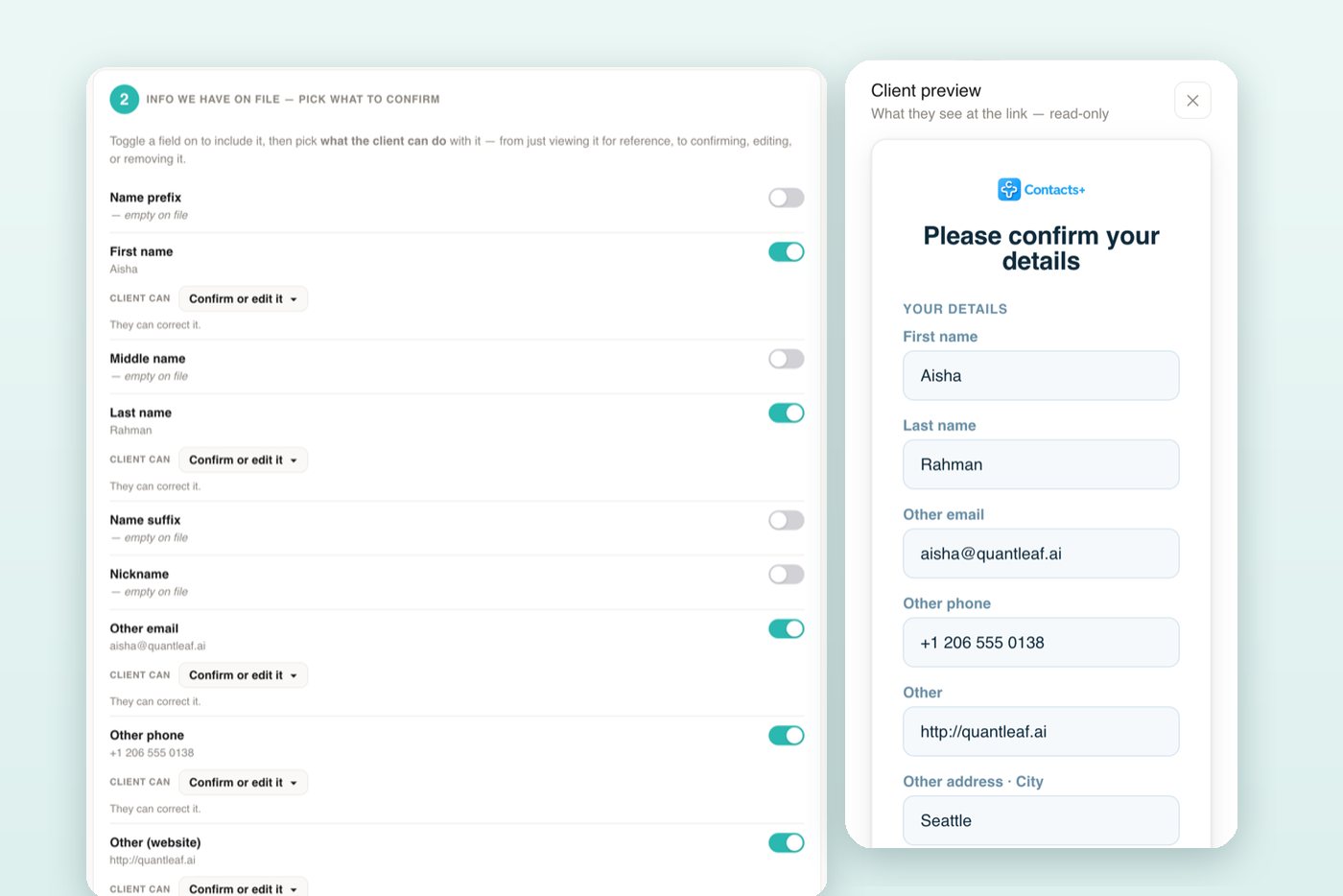
Resist the urge to ask for everything while you have their attention. Every extra field is another reason to close the tab. It also helps to decide, field by field, what the client can do: some details are shown for reference only, some you want confirmed, and some they should be free to change or delete.
When to send it
Pick a fixed moment each year and attach the request to it. For an advisor that’s the annual review. For an insurance agent it’s the renewal, and for an accountant it’s the few weeks before tax season. The annual review template is short enough to paste into a message you’re already sending.
Outside the schedule, send one when something tells you a record has drifted: an email bounces, a letter comes back, or a contact’s LinkedIn shows a new employer. It’s also worth doing before anything that costs money to get wrong, such as holiday cards or a printed invitation.
And if a client mentions they’ve moved or married, ask then. They’ll see you listened.
Plenty of people won’t reply the first time. One polite follow-up reminder a week later does the job. Resending the full request usually doesn’t.
How different firms use it
Financial advisors and broker-dealers
Here it’s a rule rather than good practice. Under SEC Rule 17a-3(a)(17), a broker-dealer has to send each individual customer a copy of their account record at intervals no greater than 36 months and ask them to report anything that’s wrong. FINRA Rule 4512 adds that when firms update those records, they should make reasonable efforts to collect the name and contact details of a trusted contact person. A prefilled form with a trusted-contact field handles both in one go. Your compliance team will have views on wording and record-keeping, so show it to them first.
Accountants and tax preparers
Clients who moved during the year often update their address with you and forget the IRS, which has its own Form 8822 for a change of address. Sending your form in January catches moves and job changes before the busy weeks, and gives you a natural moment to remind them about the 8822.
Insurance agents
Renewal is the obvious time. Confirming the address and phone number beforehand means the renewal notice, and any claims letters after it, go where the client actually lives.
Consultants, agencies and B2B sales
Business contacts drift fastest, for the job-change reasons above. A yearly check on title, company and direct line keeps proposals and invoices going to someone who can still sign them. The sample email to a client was written with this case in mind.
A word on privacy
Asking people to check their own details is the surest way to keep data accurate, because they’re the ones who know. If you hold data on people in the EU, it’s also expected of you: Article 5(1)(d) of the GDPR says personal data must be “accurate and, where necessary, kept up to date.” Whatever your location, tell people why you’re asking, ask for no more than you need, and note when each client confirmed.
Sending it
Build the form once and save it, so next year it’s mostly a matter of hitting send. Prefill whatever you already know. Send it however the client prefers: email suits most people, but for clients who live on their phones a two-line text message with the link gets answered faster. When answers come back, read them before they go into your records. People make typos in forms too.
Client update requests in ContactsPlus are built around this. You choose the fields and what the client can do with each one, add a question if you like, and create a secure link. ContactsPlus doesn’t send the message for you. You paste the link into your own email or text, so it arrives from you. Your client sees their details already filled in and confirms or corrects them, and each change waits in your review queue until you approve it. See how client update requests work, with six ready-to-send templates.
Frequently asked questions
What should a client information update form include?
The contact details you actually use, work details for business clients, how they prefer to be contacted, one short question and a consent line. Prefill what you already have.
How often should I ask clients to update their information?
Once a year works for most relationships, ideally tied to a review or renewal. Broker-dealers must do it at least every 36 months, and many do it more often.
Is a form better than just emailing clients to ask?
You need both. The email explains why you’re asking, and the form gives you answers in fields you can review and save. A reply typed into an email still has to be copied into your records by hand.
Is a client information update form the same as a customer information update form?
Yes. Professional firms tend to say client, and banks and retailers say customer. If you’re writing to a long list, the customer email template is worded for that.
Can I send the update request by text message?
Yes, and for some clients it works better than email. Keep it to two sentences, say who it’s from and why you’re asking.
Related articles
From ContactsPlusLet clients confirm their own details with a prefilled formSee client update requests →


Put your contacts to work
Keep every client record current with ContactsPlus — free to start.
Sign up free ← Back to all articles