







Client update requests
Request updated
contact information
Copy one of the free templates below to ask a client for their current details. Or skip the back-and-forth: send a secure ContactsPlus link, let the client correct their own record, and approve each change before it’s saved.
At a glance
Client update requests in ContactsPlus turn “please send me your new details” into a secure, one-time link. You choose which details to ask about and what the client may change, paste the link into your own email or text, and the client confirms, edits or removes their own information — no account, no app. Every change waits in your Assistant until you approve it.
- You pick the fields, and what the client can do with each one
- Optional survey questions, a notes box and a consent checkbox
- One link per client, one response per link, expiry from 3 to 90 days
- Nothing is written to the contact until you apply it
- Save a form as a template and reuse it for every client
Free templates
Sample emails and letters to request updated contact information
Short, personal and easy to answer: that’s what gets a reply. Copy one, swap in the details in brackets, and send it from your own account.
Email to a client
For clients you email regularly.
Subject: Quick check: are your details still current?

Hi [First name],

I'm updating my records and want to make sure I can still reach you. Could you take a minute to confirm or correct the details I have on file?

[Link to your update form]

It takes about a minute, and nothing changes until I've reviewed it.

Thanks,
[Your name]
[Company]
Text message
For clients who answer texts faster than email.
Hi [First name], it's [Your name] from [Company]. I'm updating my contact list. Could you confirm your details here? [Link] Not sure it's me? Just reply to this text.
Formal letter or notice
For regulated or formal relationships.
Dear [Client name],

As part of keeping our records accurate, we ask clients to review their contact information once a year. Please confirm or update your phone number, email address and mailing address using the secure form below by [date].

[Link to your update form]

If anything has changed, the form lets you correct it directly. If you have questions, contact [Your name] at [phone or email].

Sincerely,
[Your name]
[Title], [Company]
Email to customers
For a customer list rather than one client.
Subject: Please update your contact details

Hi [First name],

We want to make sure our messages, invoices and deliveries reach you. Please take a minute to check the contact details we have on file and update anything that has changed.

[Link to your update form]

Thank you for helping us keep your account up to date.

[Company] team
Follow-up reminder
For anyone who hasn’t replied after a week.
Subject: Re: Quick check: are your details still current?

Hi [First name],

Just a quick reminder in case my last note got buried. If your contact details are the same, one tap confirms it. If anything has changed, you can update it here:

[Link to your update form]

Thanks,
[Your name]
Annual review, short version
For a once-a-year check-in with existing clients.
Hi [First name],

Once a year I ask clients to check the details I keep for them: phone, email and address. Could you take a look before [date]?

[Link to your update form]

Thanks,
[Your name]
No link yet? Ask clients to reply with any changes and copy them into your address book by hand — or let ContactsPlus build the link for you, as shown below.
How it works
Five steps, start to finish
Clients keep their own details accurate for you, and you stay in control of what’s asked, what can change and what gets saved.
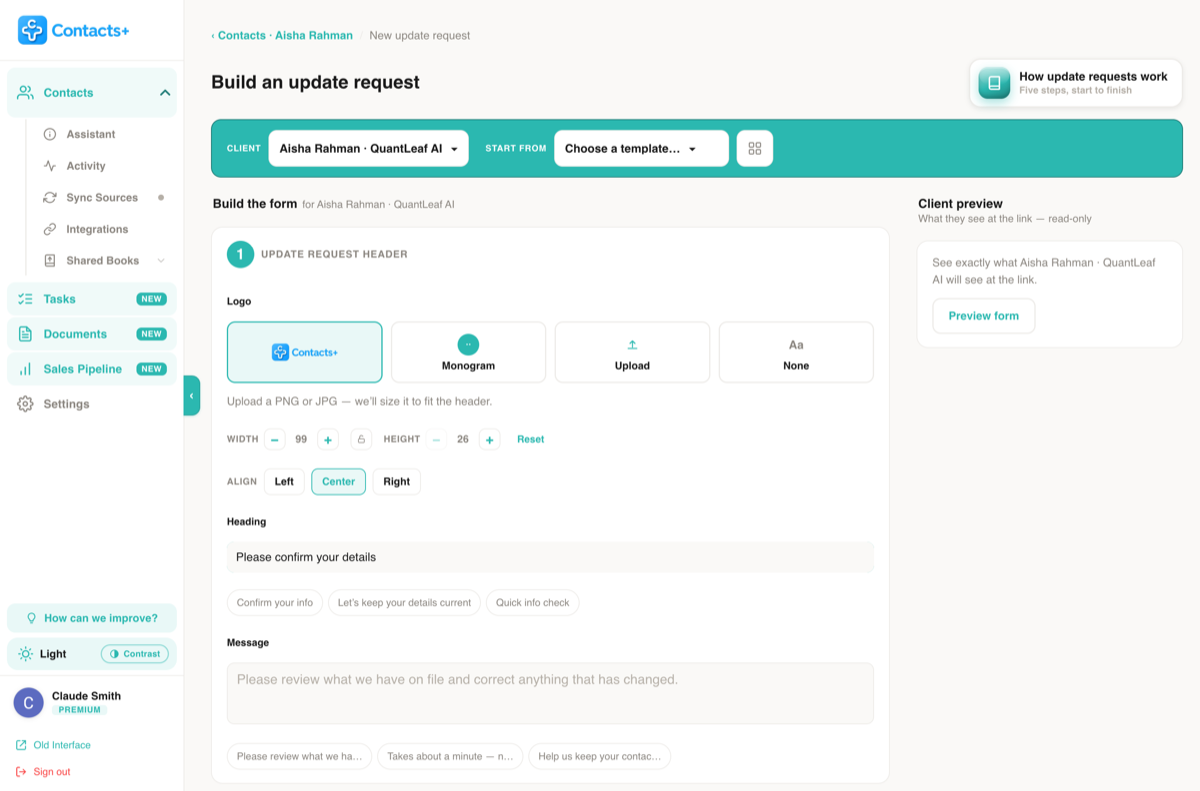
Build the form
Choose the client, pick which details to include and decide what they can do with each one. Add your own heading and message, a few survey questions if you like, and options such as a notes box or a consent checkbox.
Copy the link
ContactsPlus creates a private link for that one client. Copy it when it appears: for security the link is stored in a form we can’t show again, so that is the only time it’s displayed.
Send it your way
Paste the link into an email or a text message, however you normally reach that client. The request comes from you, not from a stranger’s address.
Your client reviews and submits
They confirm what’s right, change what’s moved and remove what’s gone, on any phone or computer. No account and nothing to install.
You approve the changes
Their updates land under Assistant > Client Requests, where you apply or ignore each change. Nothing is saved to the contact until you do.
Ask only about what you need
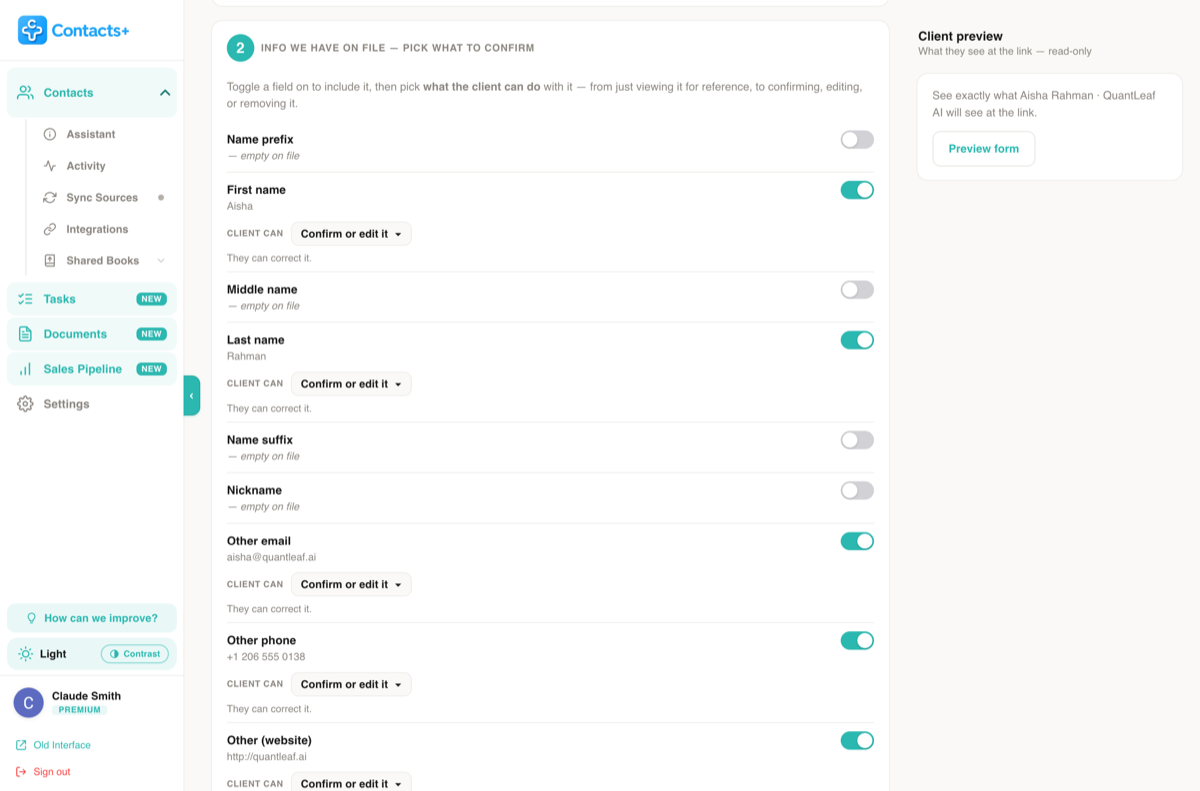
The builder lists everything you have on file for the client, plus the fields that are still empty. Toggle a field on to include it, then decide how much say the client gets.
- View only — show it for reference
- Confirm or edit — let them correct it
- Confirm, edit or remove — for details that may be gone entirely
- Optionally let clients add details you didn’t ask for
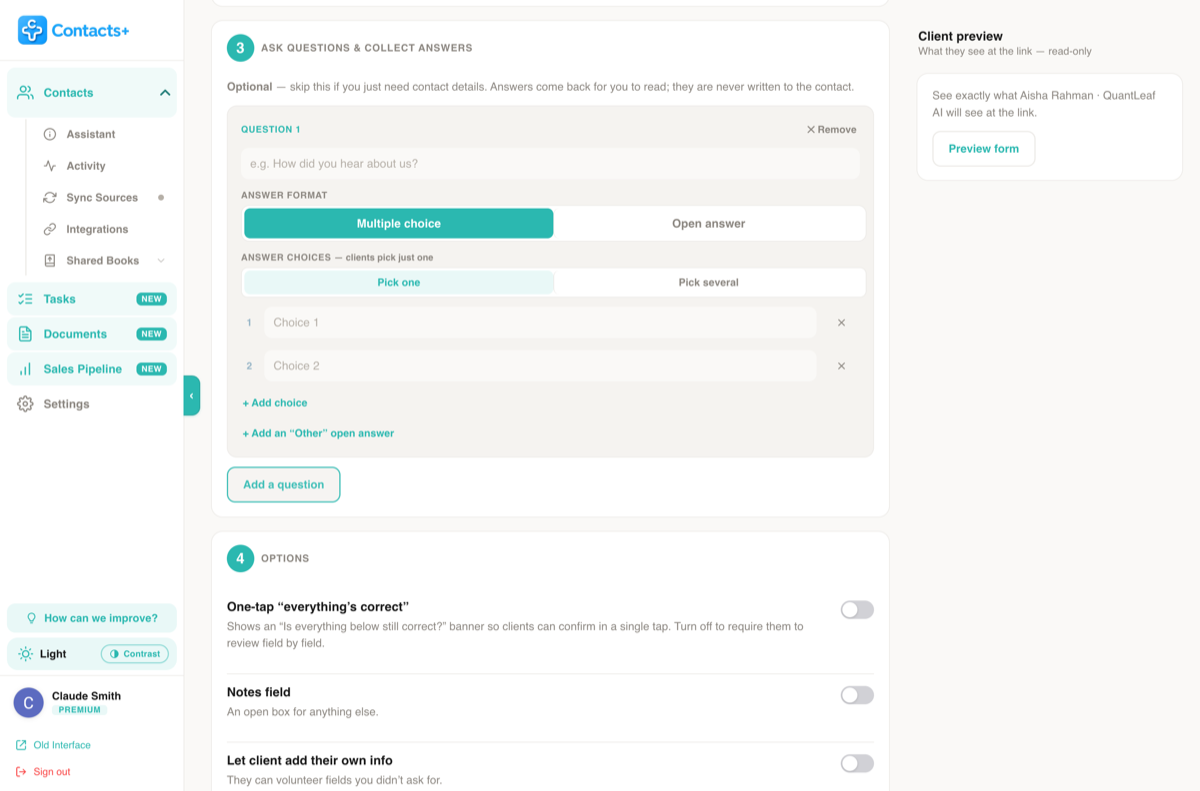
Ask a few questions while you’re at it
Already reaching out? Add a short survey to the same request — how they heard about you, how they prefer to be contacted, what they need next.
- Multiple choice (pick one or several) or open answer
- Add an “Other” option with its own free-text box
- Answers come back for you to read and are never written to the contact
- Survey results keeps a running tally across every client
What your client sees
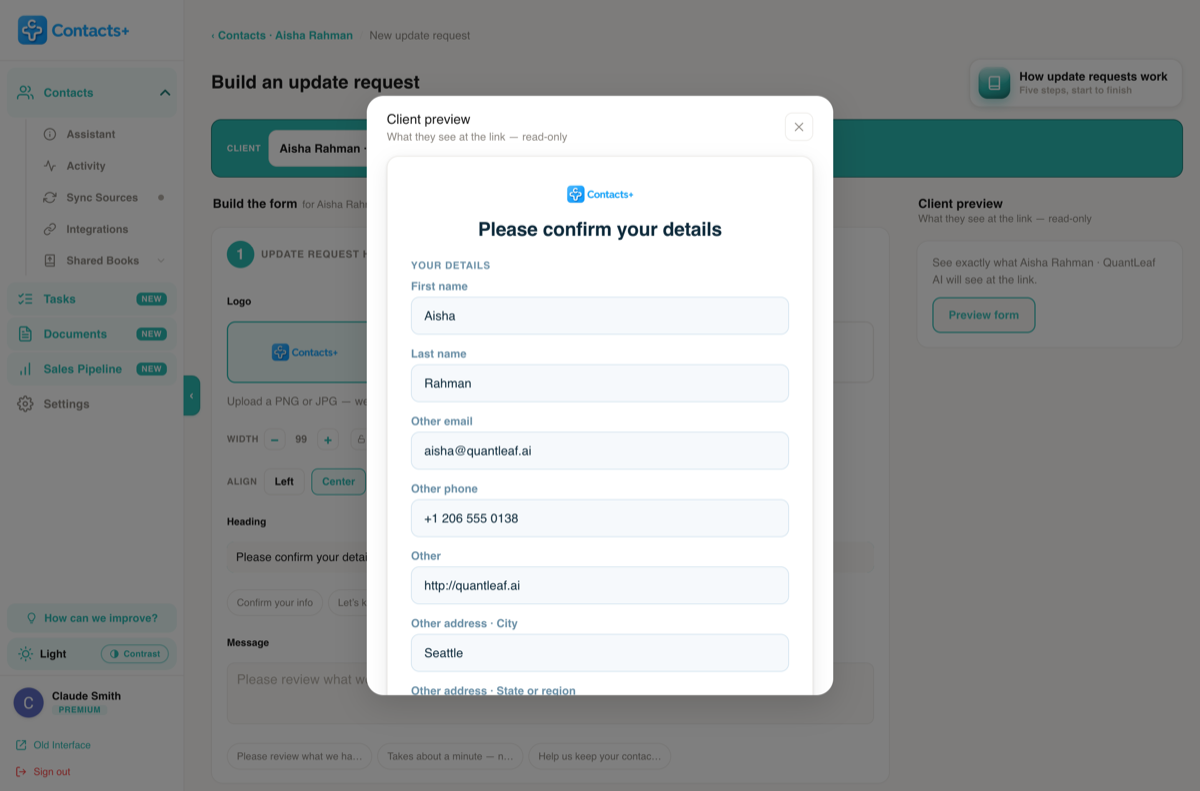
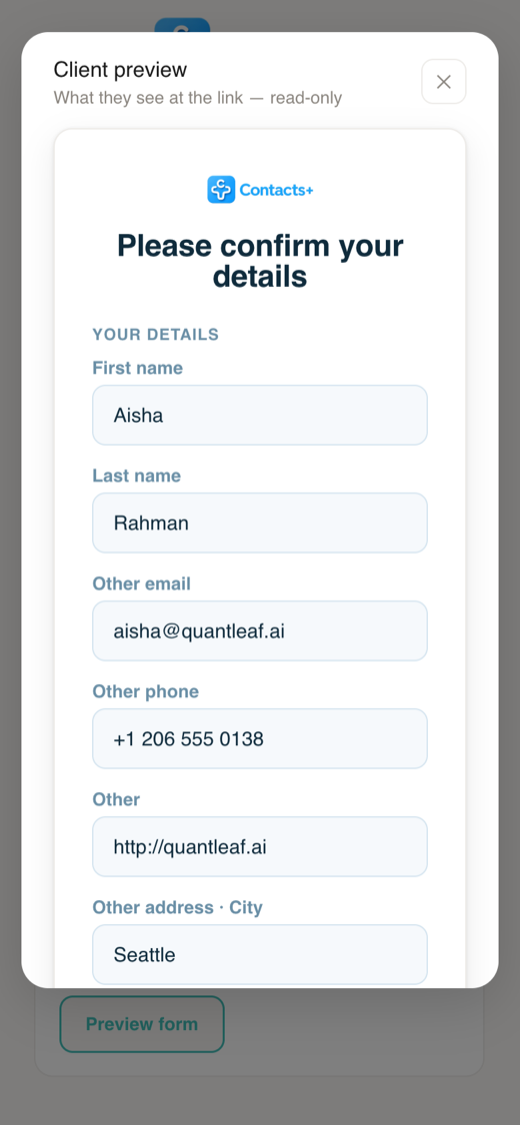
A simple form with their details already filled in
Your client opens the link and sees what you have on file, ready to confirm or correct. It works on any phone or computer, with nothing to install and no account to create. The preview in the builder shows exactly what they’ll get.
Make it yours, and keep a record of consent
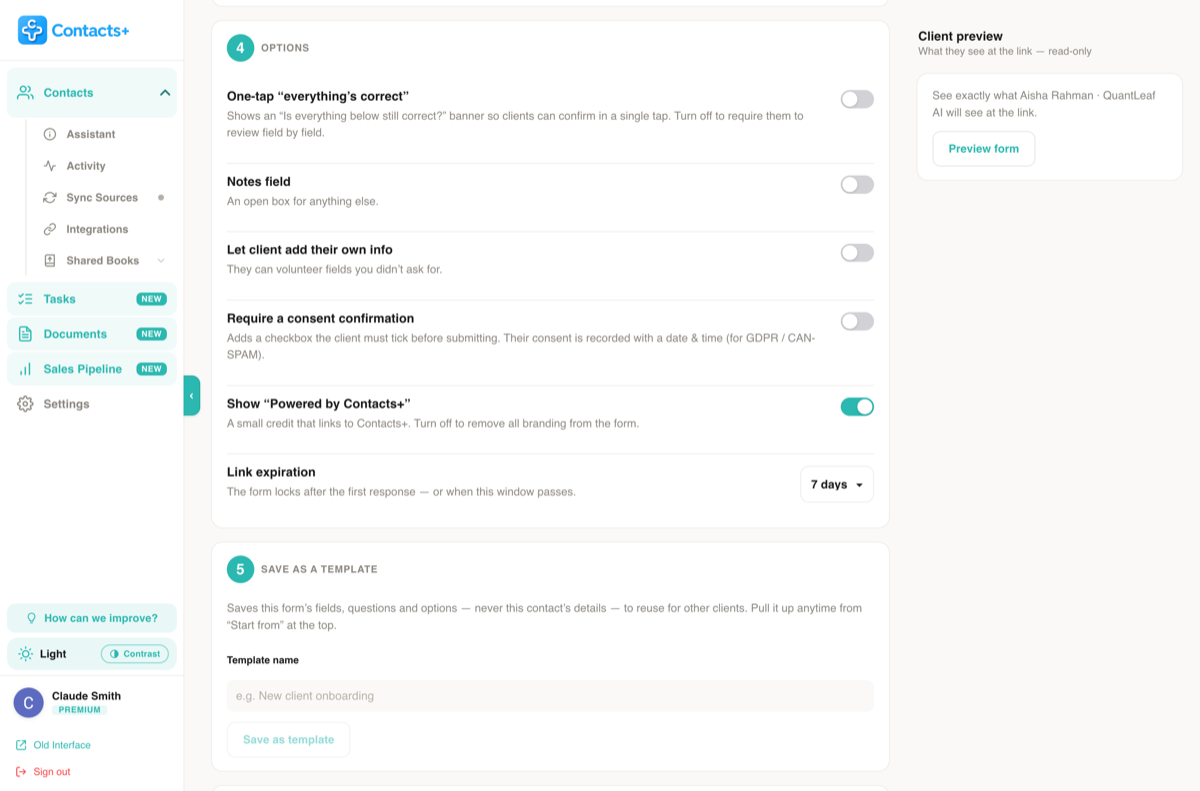
Set the request up the way your clients expect to hear from you, then save it as a template so the next one takes seconds.
- Your branding — upload your own logo, use your initials, or show no logo at all
- One-tap “everything’s correct” for clients whose details haven’t changed
- Consent checkbox — recorded with the date and time
- Link expiry of 3, 7, 14, 30, 60 or 90 days
- Templates save the fields, questions and options — never the client’s details
You stay in control
Every change waits for your approval
Replies land in your Assistant under Client Requests, next to the updates ContactsPlus already suggests. Each one shows what the client changed, or that they confirmed everything is still right. Apply it, ignore it, or apply all of them at once.

No retyping
Clients enter their own changes, so there’s nothing to copy out of an email reply.
Nothing saved blindly
You see each change before it touches the record, and choose which ones to keep.
Track who replied
Sent requests shows which links were answered and which expired, with a one-click new link.
Questions, answered
Requesting updated contact information, explained
How do I ask a client to update their contact information?
Send a short, personal message that says why you’re asking, shows what you have on file, and makes replying easy. The templates on this page work as-is. With ContactsPlus, you build an update request, copy its secure link into that message, and the client corrects their own details instead of replying with them.
What should an email asking customers to update their contact details say?
Keep it short: say why you’re asking, show or link to the details you have on file, make it easy to respond with a link or a reply, and name a person to contact with questions. A date to respond by helps, and a single reminder a week later catches most of the people who missed the first email.
Does ContactsPlus send the email for me?
No. ContactsPlus creates a private link for each client, and you paste it into an email or text message from your own account, however you normally reach that client. The request comes from you, which is part of why clients trust it.
Does my client need an account or an app?
No. The link opens a simple form in any browser, on a phone or a computer. There is nothing to install and no account to create.
What can my client change?
Only the fields you choose, and only in the way you allow. For each field you decide whether the client can just see it, confirm or edit it, or also remove it. You can also let them add details you didn’t ask for, and include a notes box.
Is anything saved to my contacts automatically?
No. What your client submits lands under Assistant, Client Requests, where you apply or ignore each change. Nothing on the contact changes until you approve it.
How long does an update request link last?
You choose 3, 7, 14, 30, 60 or 90 days. Each link is unique to one client and accepts a single response, then locks. If it expires before they reply, you can create a new link from Sent requests.
Can I record my client’s consent?
Yes. Turn on the consent confirmation option and the form adds a checkbox the client must tick before submitting. Their consent is recorded with the date and time.
Can I ask my clients questions as well?
Yes. Add multiple-choice or open-answer questions to any request. Answers come back for you to read and are never written to the contact, and Survey results keeps a running tally of how everyone responded.
Let clients keep
their own details current
Build your first update request in a couple of minutes.
Sign up free