







For Consultants
A Simple CRM
for Consultants
Half your clients are in Gmail, your prospects are on your iPhone, and one referral partner’s number sits in an Outlook account you stopped using. ContactsPlus pulls those contacts into one synced address book and keeps the follow-ups and files on the person they belong to.
At a glance
ContactsPlus is a simple CRM for consultants: one synced address book for clients, prospects and referral partners, with follow-up reminders and files on each contact. It doesn’t do invoicing or time tracking.
- Pull Google, iCloud and Outlook contacts into one list, up to five accounts on Premium
- Keep follow-up tasks, dated notes and tags on each client’s record
- Attach contracts and scopes to the contact, with 10 GB of storage on Premium
- Share one address book across a small firm on Teams
The problem
Where a consultant’s contacts really live
Monday starts with an intro email from a former client. Her number’s on your iPhone, but her new address only exists in an Outlook thread, and the Google account you used for her old company still has the previous one. You reply from memory and half-remember promising her a revised scope.
By Wednesday you’re deep in a different engagement, and the prospect you meant to call after their budget meeting has gone quiet. Nothing broke. The reminder to call in two weeks was a line in a spreadsheet, or a text to yourself, and neither of those can interrupt you.
Referrals go cold more slowly. The partner who sent you two clients last year hasn’t heard from you since the thank-you note. Nobody decided to let that lapse, but without a prompt you follow up with whoever’s loudest, and the person who sends you work quietly is easy to miss. If referral groups feed your practice, contact management for networking covers the events side of it.
Then a client asks for the signed statement of work. It’s in an email attachment somewhere, or in Downloads under a name like final_v3.
Fixing any of that takes one record per person, with the next step and the paperwork attached to it. Some people call that a personal CRM, and for a consultant whose work comes through relationships it can be the whole job.
What it does
How ContactsPlus covers that week
One list from every account
Connect Google, iCloud and Outlook and ContactsPlus pulls them into one list, syncs them in real time on Premium and can merge the same client across accounts. The how sync works page explains the sync directions you can set, and duplicate merging covers the merge itself.
Follow-ups on the client
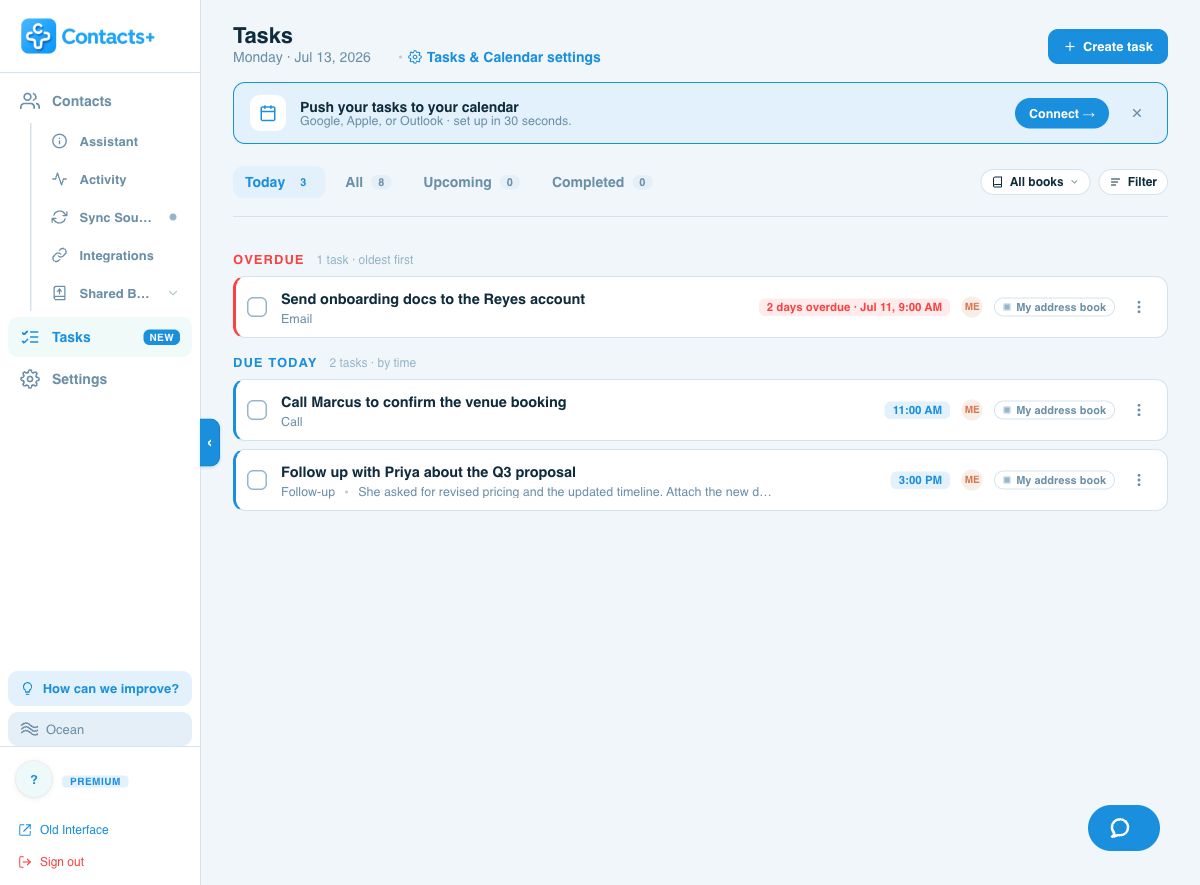
Add a task to any client with a due date and ContactsPlus reminds you. Overdue ones come first in the Today view, and timed tasks can push one-way to your Google, Outlook or Apple calendar. There’s more on how follow-up reminders work, including which plan they need.
Notes and files on the record
Dated notes, tags and custom fields sit on every record. Attach the signed scope to the client and link the same file to their company. Storage limits by plan are on the attaching files to contacts page.
Add contacts from a photo or screenshot
Photograph a card, or screenshot a LinkedIn profile or an email signature, and AI turns it into a saved contact. On Premium, enrichment then adds titles, companies, photos and social profiles from publicly available data. The business card scanner and contact enrichment pages go into each one.
Clients update their own details
Send a client a secure update request link and they correct the details you chose. They don’t need an account or an app. Every change waits for your approval before it touches the record. You paste the link into your own email or text.
Client briefings from your AI assistant
On Premium, connect Claude, ChatGPT or Grok to your address book through our AI assistants connection and ask for a briefing on a client before the call. It reads the notes, tags and recent activity ContactsPlus holds. Suggested changes wait for your approval, and it can never delete a contact.
Follow-ups
Overdue first, then today
Link a task to a client and it shows up in your task list and on their record. In the screenshot, one overdue task sits above two that are due today.
Getting started
Getting your clients in
Coming from a spreadsheet? The client follow-up tracker guide shows which columns to keep and where each one goes.
Connect the accounts your clients are in
Add the Google, iCloud and Outlook accounts you use for work, and the ones you’d half forgotten. If you’d rather start from a file, a CSV or vCard import works on any plan.
Merge the doubles
On Premium, ContactsPlus finds the same person across those accounts and shows you where the two records disagree. You pick the value to keep, or keep both.
Give each live client a next step
Open the client, add a task with a due date, and write what happened last as a dated note so it’s still there at the next call.
Attach the paperwork
Drop the signed scope onto the client’s record. One file can be linked to several contacts, so the same document can sit on the client and on their company.
Small firms
When there’s more than one of you
ContactsPlus Teams gives a small firm one shared address book with Owner, Admin and Member roles, shared notes and a named owner on each contact. When someone leaves, their contacts stay with the team. Shared tasks and assignment are part of Teams too, and every member gets everything in Premium, up to ten synced accounts and no cap on contacts.
Teams is $12.99 per user a month billed annually, or $17.99 billed monthly, and a team can have up to 50 people.
Worth knowing first
When you need a bigger CRM
ContactsPlus keeps contacts, notes, follow-up tasks and files together on each person. It has no invoicing, time tracking or project tracking, so a signed statement of work can live on the client’s record while billing and delivery run somewhere else.
It isn’t a bulk emailer. Email opens in your own Gmail, Outlook or Apple Mail, one person at a time.
If you bill by the hour and want invoices built from tracked time, look at a practice-management tool.
You can run both. ContactsPlus can pass new contacts on through Zapier, which connects to CRMs such as Pipedrive, and other connections are on the integrations page.
Questions
Frequently asked questions
What is the best CRM for independent consultants?
If your work comes through relationships and you want clients, prospects and referral partners in one place with a nudge to follow up, a light contact-based CRM like ContactsPlus fits. If you need invoicing or time tracking built in, a practice-management tool will serve you better. The “When you need a bigger CRM” section on this page says where ContactsPlus stops.
Do consultants need a CRM?
Not always. With a handful of clients, a good address book and a spreadsheet can carry you a long way, and the client follow-up tracker page shows how to build one. A CRM starts paying off when the same client lives in your phone and your email, or when a reminder has to reach you instead of waiting for you to open a sheet. A second person who needs the same view is the other trigger.
Can I use ContactsPlus with Gmail and Outlook at the same time?
Yes. ContactsPlus connects Google, iCloud and Microsoft/Outlook accounts and pulls them into one list. Premium connects up to five and syncs in real time, and Teams connects up to ten. You choose a direction for each account: pull contacts in, sync both ways, or push your list out. See how contact sync works.
How much does ContactsPlus cost for a consultant?
Premium is $9.99 a month billed annually, or $13.99 billed monthly. It includes up to five accounts, 25,000 contacts, real-time sync, follow-up reminders, enrichment, duplicate merging, card scanning and the AI assistant connection. Teams is $12.99 per user a month billed annually, or $17.99 monthly, and adds a shared address book. A Free plan with one account and 1,000 contacts is also available. The pricing page has the full comparison.
Can I attach contracts and files to a client?
Yes. You can attach PDF, Word, Excel, PowerPoint, image and text files of up to 25 MB each to any contact, and link one file to several contacts, such as the client and their company. Storage is 10 GB on Premium, and on Teams it’s pooled across the account rather than set per seat. See attaching files to contacts.
Will it replace my invoicing or time-tracking tool?
No. ContactsPlus holds contacts, notes, follow-up tasks and files, and it doesn’t do invoicing or time tracking. Keep your billing tool for that. Your contacts export as CSV or vCard whenever you want them.
Start with the contacts you already have.
Connect an account and see your clients in one list. Premium is $9.99 a month billed annually.
Get started