







For Freelancers
A Simple CRM
for Freelancers
A client finds you through a LinkedIn message or a referral email, and some of them would hire you again if you checked in. ContactsPlus keeps each person in one synced address book, with their files and a dated task for the next check-in attached, and the reminders come with Premium.
At a glance
ContactsPlus is a simple CRM for freelancers: one synced address book for current clients, past ones and new leads, with notes, tags and files on each contact. Premium is $9.99 a month billed annually and includes the follow-up reminders. It has no invoicing or time tracking.
- Pull Google, iCloud and Outlook contacts into one list, up to five accounts on Premium
- Keep tags, custom fields and dated notes on every contact, on any plan
- On Premium, save a contact from a business card, or from a screenshot of a LinkedIn profile or a DM
- Attach agreements and briefs to the client, with 10 GB of storage on Premium
The problem
The clients who’d hire you again
A client whose site you built eighteen months ago posts that she’s opening a second shop. She’d probably want you on it. But the last thing you sent her was the handover document, her number is saved on your iPhone under a first name only, and her new email address exists in one thread you can’t quite find. So you don’t write, and she hires whoever she talked to last week.
Inquiries arrive in pieces. The budget and the deadline came by email on Tuesday, and the question that decides the quote, what the thing actually has to do, came in a DM on Thursday. You answer the DM, forget the email, and a week later you’re scrolling two apps for one person. A screenshot of that message can become a saved contact on Premium, through the business card scanner.
Repeat clients reorganize without telling you. The brief for the new campaign is signed by an art director you’ve never emailed, since the person who used to hire you left in the spring. Your contact at that agency is still the old one, and nothing in your phone says so.
Working alone means nobody else is keeping track. A spreadsheet can hold it, and the client follow-up tracker guide lays out which columns earn their place. One record per person, each with a date for the next check-in, is what a personal CRM gives you.
What it does
What ContactsPlus does for a freelancer
Every client in one list
Connect the Google, iCloud or Outlook account your clients write to and ContactsPlus pulls those contacts into one list. On Premium it can also merge the same person when two accounts disagree about them. The contact sync page explains the directions you can choose, and removing duplicate contacts covers the merging.
Tags and notes that fit the work
Tag past clients apart from current ones, write a dated note after each call, and add custom fields for whatever you track about a client. You can link a contact to the colleague who referred them. All of that comes with every plan, along with CSV and vCard import and export.
Reminders on the check-in
Add a task to a past client with a due date, and ContactsPlus reminds you, so “ask about the second shop in March” doesn’t depend on your memory. Reminders are part of Premium, with a limited trial first. Timed tasks can push one-way to your Google, Outlook or Apple calendar, as the follow-up reminders page shows.
Contacts from whatever you were sent
Screenshot a LinkedIn profile or a DM, or photograph a card, and the scanner reads the details into a saved contact. Scanning comes with Premium. Premium also fills in titles, companies and photos from public data with contact enrichment, and it can pull details out of Gmail signatures.
The agreement on the client’s record
Attach the signed agreement, the brief or the quote to the person who sent it, and link the same file to their company if it belongs there too. Uploads can be PDF, Word, Excel, PowerPoint, image or text files of up to 25 MB each. The Documents library and the rest are under attaching files to contacts.
Ask clients for their new details
When a client changes agencies or phones, you can simply ask. The client update requests page has email and text templates you can copy as they are. ContactsPlus can also make a secure link where the client edits the details you chose, and nothing is saved to the contact until you approve it.
On the record
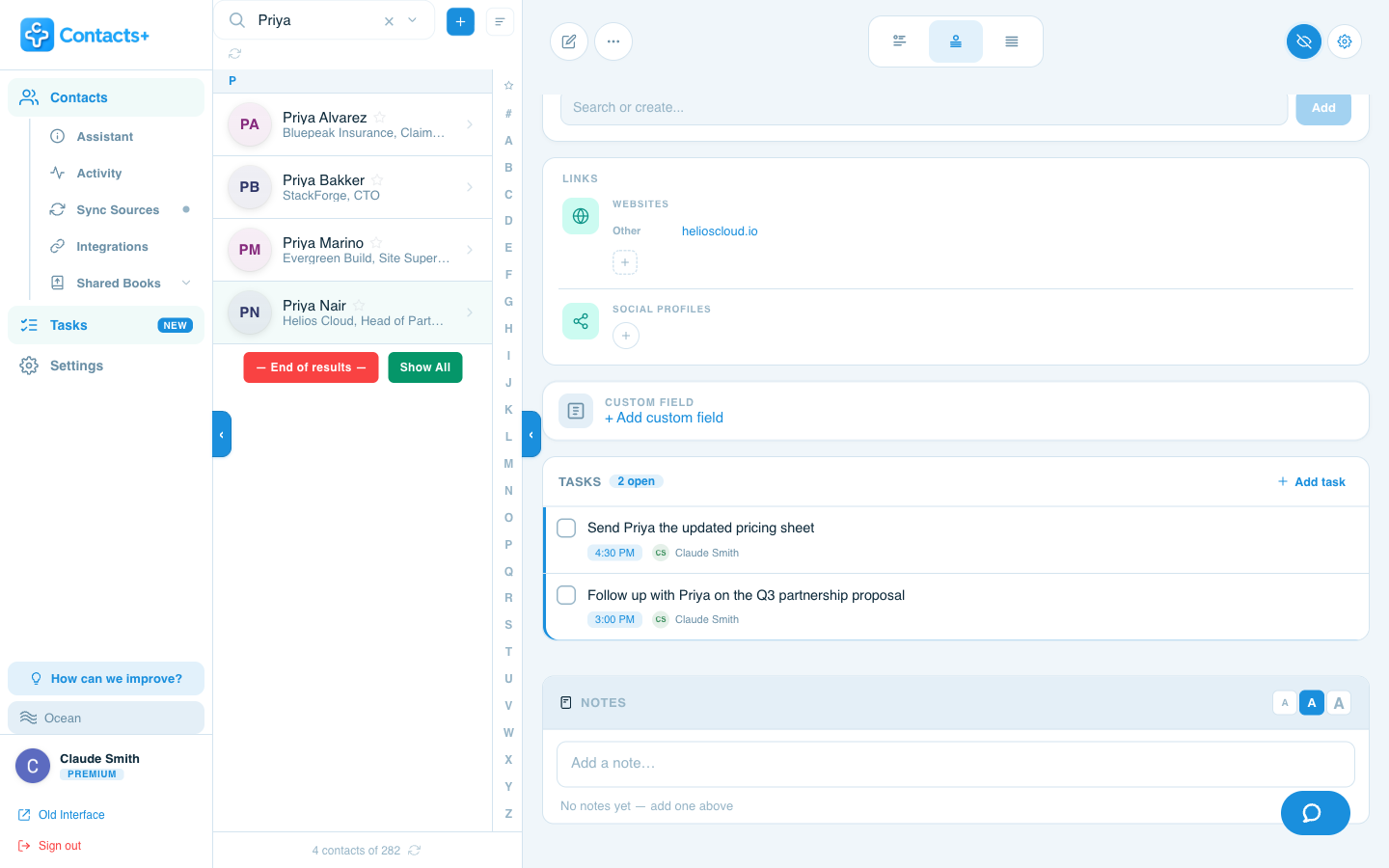
Open a client and see what’s next
Each contact has a Tasks section above Notes, with a count of what’s open and the time each task is due.
What it costs
What $9.99 a month gets a freelancer
Premium is $9.99 a month billed annually ($119.88 a year), or $13.99 billed monthly. That gets you up to five connected accounts, 25,000 contacts and real-time sync, with 100 card and screenshot scans a month and 10 GB of file storage. It also includes enrichment, duplicate merging, Gmail signature extraction and the AI assistant connection for Claude, ChatGPT or Grok.
Each contact record is complete on any plan, with as many emails, phone numbers and addresses as you need, a company and job title, links and social profiles, custom fields, tags, relationships and dated notes. You can import and export as CSV or vCard whenever you like. Reminders are what keep a past client from going quiet, and they’re part of Premium.
If your clients all sit in one account and you only want a tidy place for notes and tags, there’s a Free plan with one account and 1,000 contacts. The pricing page lists every feature by plan.
First steps
Getting set up
Start with the handful of past clients you’d most like to hear from again.
Connect where clients write to you
Add the Gmail, iCloud or Outlook account most of your client email goes through. Start with the busiest one and add the others later, up to five on Premium. If your client list lives in another tool, a CSV or vCard import works on any plan.
Mark who’s who
Tag current and past clients differently, and mark the leads. Then write a dated note on each past client about what you made for them and how it went, so the context is there when you reach out.
Add a check-in date to repeat clients
Pick the past clients most likely to need you again and add a task to each with a day to check in. Reminders are part of Premium.
File the paperwork where you’ll look
Drop the signed agreement and the final brief on the client’s record. When one contract covers two people, link the single file to both.
Worth knowing first
What ContactsPlus doesn’t do
ContactsPlus holds people, notes, tasks and files. There’s no invoicing, no time tracking and no project records. If you want to bill by the hour and manage the work in the same tool, a freelancer invoicing or project-management app is the better choice.
Tapping Email on a contact opens a draft in your own Gmail, Outlook or Apple Mail. ContactsPlus has no newsletter tool.
File storage has limits that matter in some trades. If your deliverables are big files, such as footage or layered design files, keep them in your usual storage, since each upload is capped at 25 MB and only certain file types are accepted.
Contacts export as CSV or vCard on every plan, as the export contacts page describes, and Zapier can pass new ones to Pipedrive, Slack, Google Sheets and other apps.
If you work on retainers and most of your work comes from referral partners, CRM for consultants is written around that.
Questions
Frequently asked questions
Which CRM should a freelancer use?
A light contact-based CRM like ContactsPlus suits a freelancer whose problem is remembering people, such as past clients and open inquiries, and knowing who to check in with next. A freelancer who mainly wants quotes, invoices, hours and project boards in one place will be better served by an invoicing or project-management app, and the “What ContactsPlus doesn’t do” section on this page lists what ContactsPlus leaves out.
How much does a CRM for freelancers cost?
A freelancer working alone would use ContactsPlus Premium, which is $9.99 a month billed annually ($119.88 a year), or $13.99 billed monthly. It includes real-time sync of up to five accounts and 25,000 contacts, follow-up reminders, 100 scans a month, enrichment, duplicate merging and 10 GB of file storage. Teams, at $12.99 per user a month billed annually, is for a shared address book. The pricing page compares the plans.
Can I cancel anytime?
Yes. You can cancel anytime from your account settings and keep access through the end of your current billing period.
Can I save a lead from a DM or a LinkedIn profile?
Yes. Take a screenshot of the message or the profile, or photograph a card, and the scanner reads the name, company, title and contact details into a saved contact. Scanning is on Premium, which includes 100 cards a month, and on Teams, which includes 100 per user a month. The integrations page also lists a LinkedIn import for your existing connections, which works on every plan.
Can I use it on my phone while I’m with a client?
Yes. There are iOS and Android apps, and the web app works on any screen size, on every plan. On Premium and Teams, the scanner is available in the iOS, Android and web apps.
Will it send invoices or track my hours?
No. There’s no invoicing, hours tracking or project board in ContactsPlus.
Connect an account and see who’s already in your address book.
Premium is $9.99 a month billed annually.
Get started