







Sales Pipeline
A sales pipeline tracker
built on your contacts
Stop juggling a pipeline spreadsheet. ContactsPlus keeps every deal on the contact it belongs to, and each morning it shows you exactly which deals need you today.
At a glance
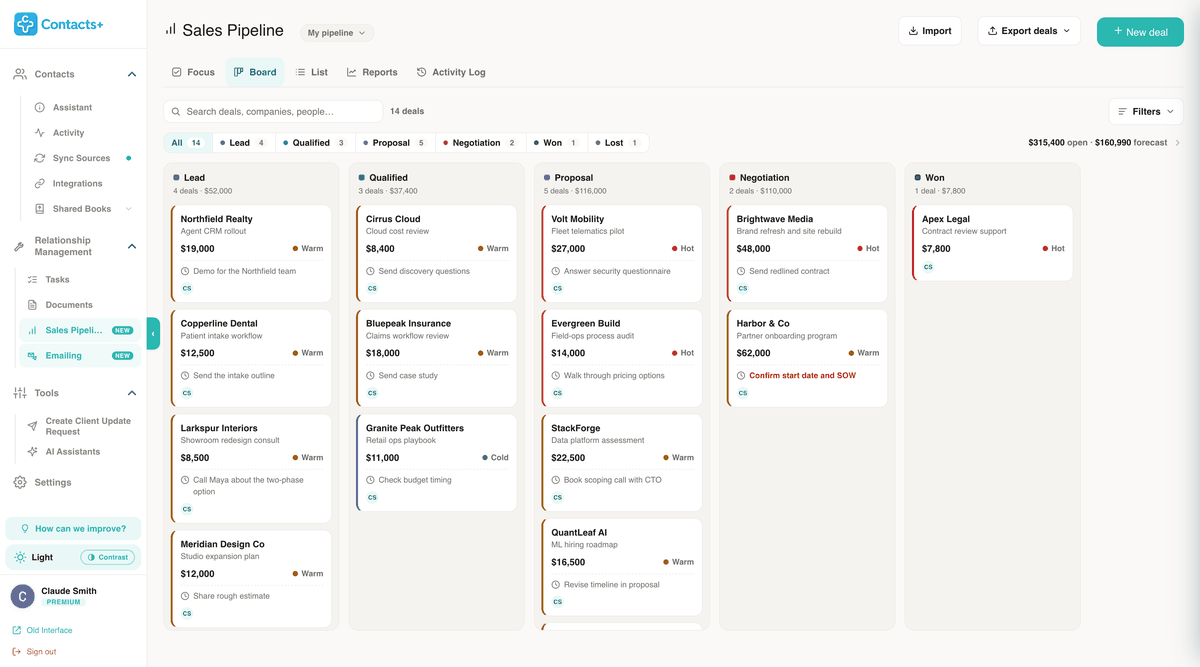
Sales Pipeline in ContactsPlus tracks deals on the contacts you already keep. Each deal carries a value, a stage, a confidence and one next step with a date. The Focus view sorts those steps into overdue, today and this week. Reports show your win rate, average deal size and weighted forecast, and every change is written to an activity log.
- Stages run from Lead to Negotiation, then Won or Lost
- Five views of the same deals: Focus, Board, List, Reports and Activity Log
- Imports a CSV from your old spreadsheet without touching your contacts
- A dated timeline of what happened on each deal
- Exports to Excel or CSV, with view-only report links for a manager
- Included in Premium and Teams; free accounts can track up to 3 deals
Start the day here
What’s due today,
with everything else out of the way
A spreadsheet shows you every deal at once and leaves you to work out which one needs you. The Focus view lists next steps instead, grouped as overdue, due today, this week and later, with a box to tick each one off as you finish it.
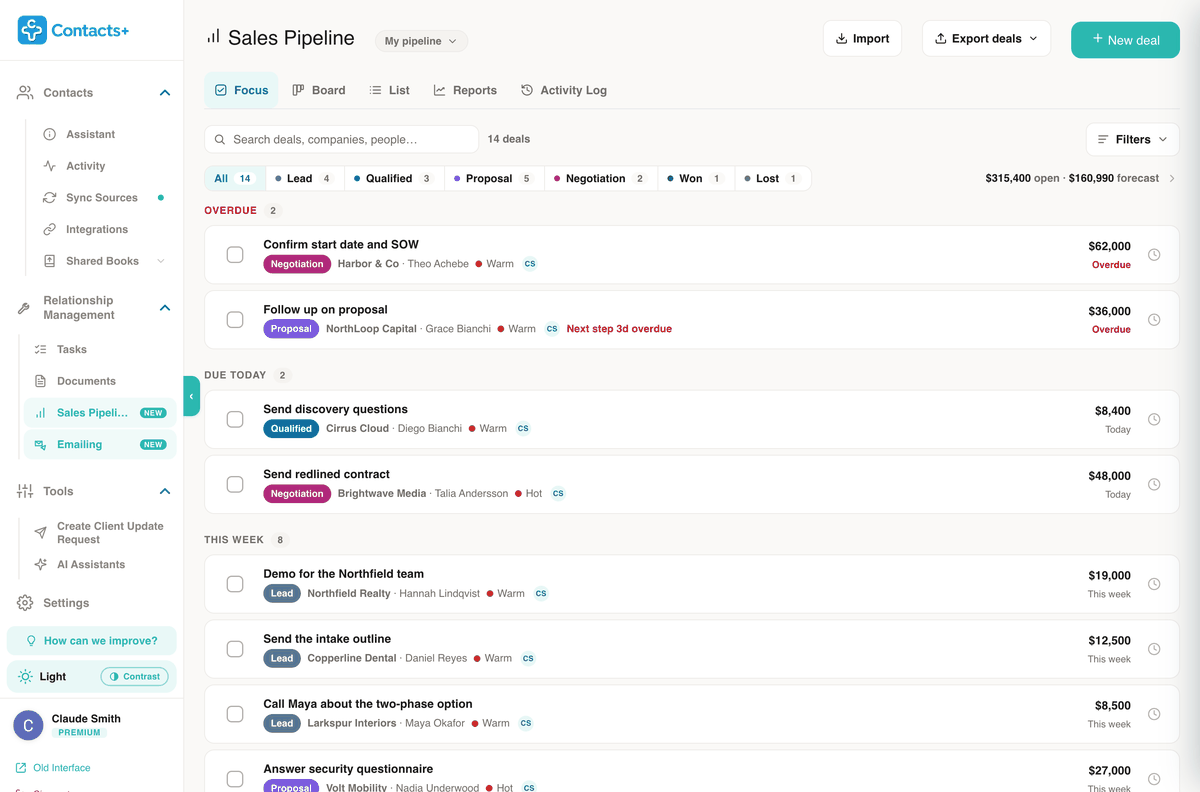
Focus
Next steps by due date, overdue first.
Board
One column per stage. Drag a card when a deal moves.
List
Every deal in a table you can sort by value, close date or last touch.
Reports
Win rate, deal size, forecast and the deals that are slipping.
Activity Log
Every change and the person who made it, by day.
Bring the spreadsheet with you
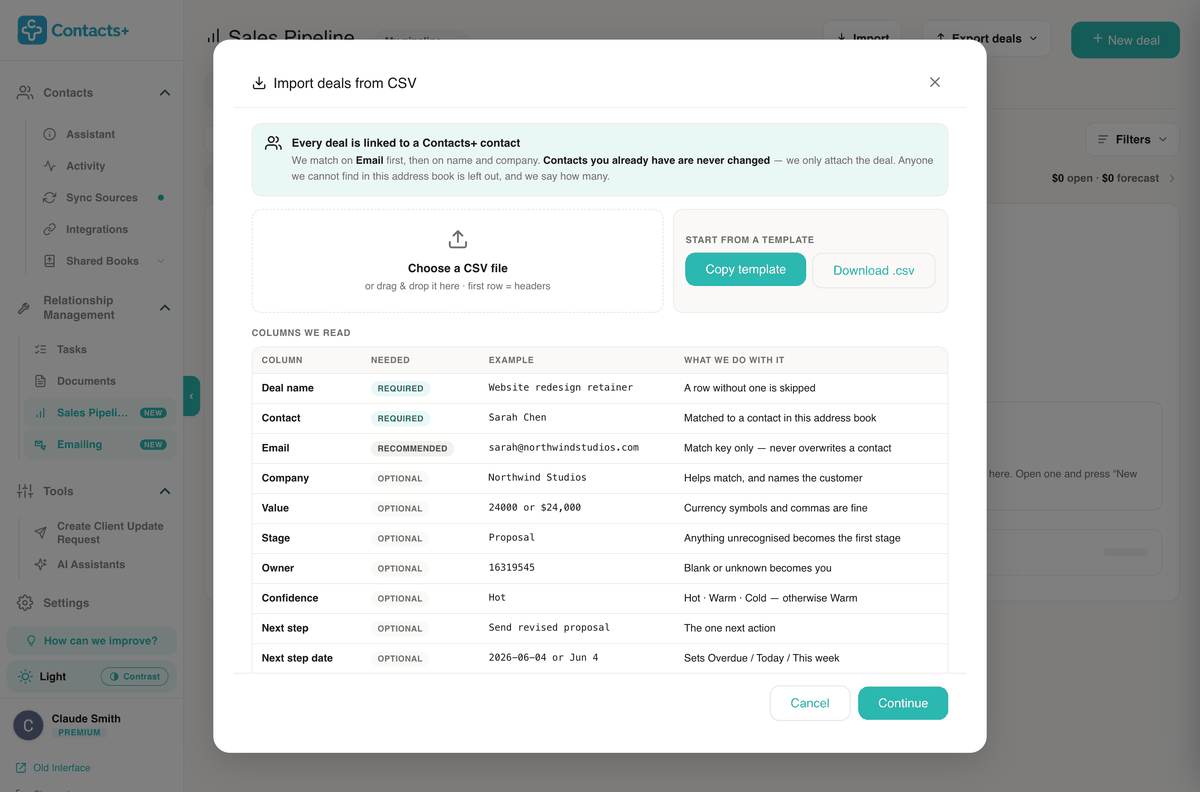
Already tracking deals in a spreadsheet? Save it as a CSV and bring it in. Only two columns are required: the deal name and the contact. Value, stage, confidence, next step, dates and source come across when you have them, and you confirm how the columns line up before anything is created.
- Matched by email first, then by name and company
- Your contacts are never changed by an import; the deal is attached
- Rows that don’t match anyone are left out, and you’re told how many
- Values like $24,000 or 24000 both work
On each deal
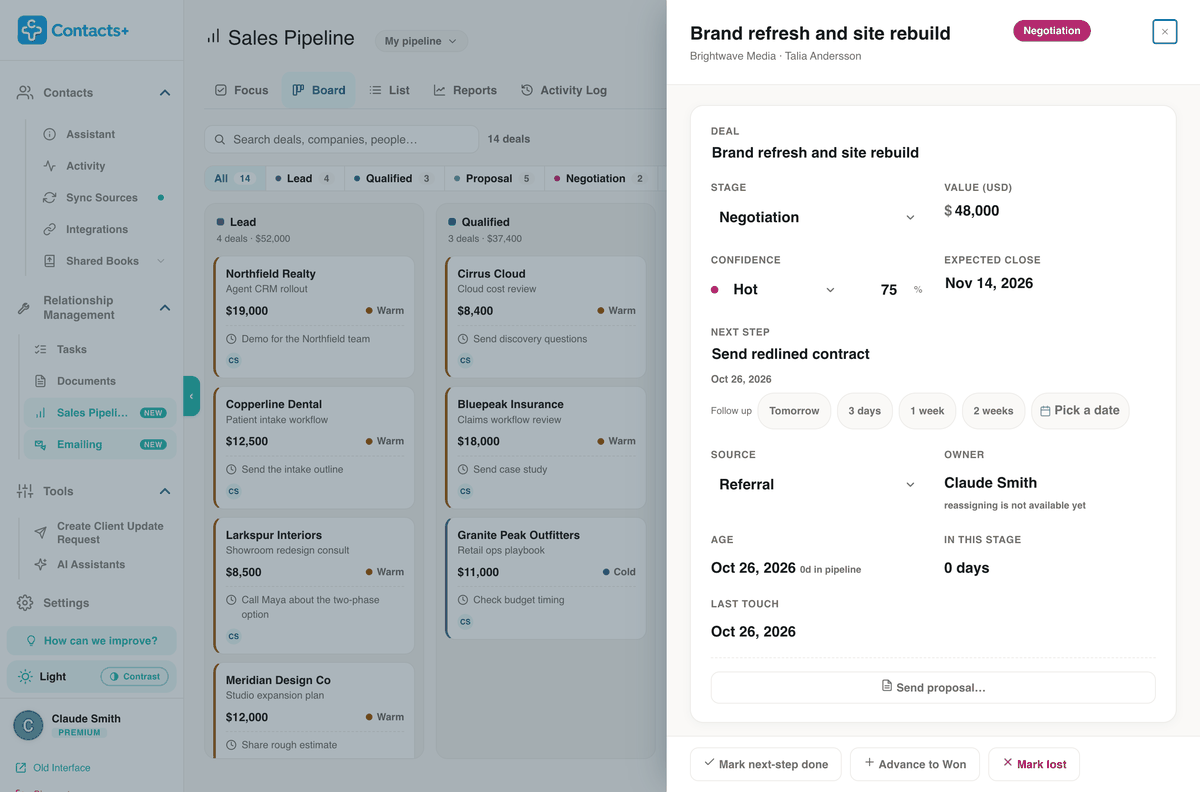
The details you’d otherwise keep in your head
Everything about a deal sits on one page, and you can change any of it in place. Below the numbers is room for what a spreadsheet has no column for: who is championing the deal, and why they’re buying.
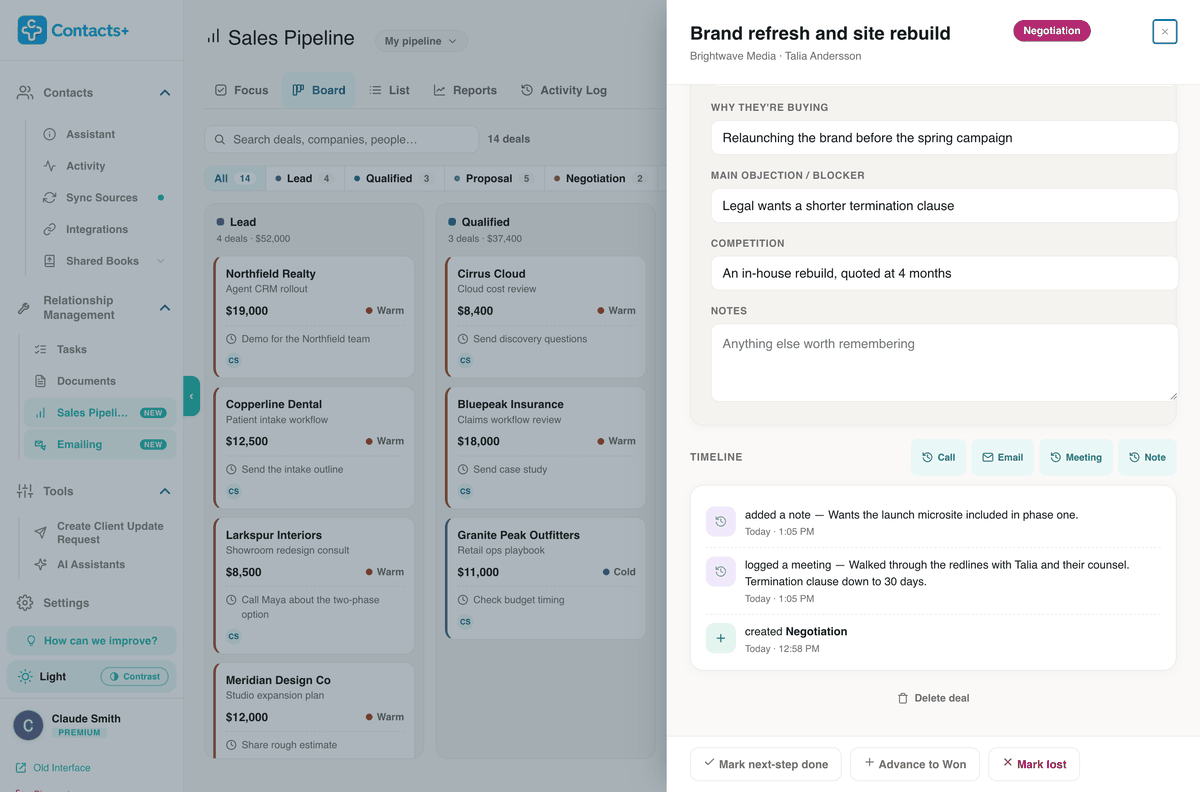
More than one person involved? Add them to the deal and give each a role: champion, decision maker, economic buyer, influencer, blocker or technical.
Send the proposal from the deal
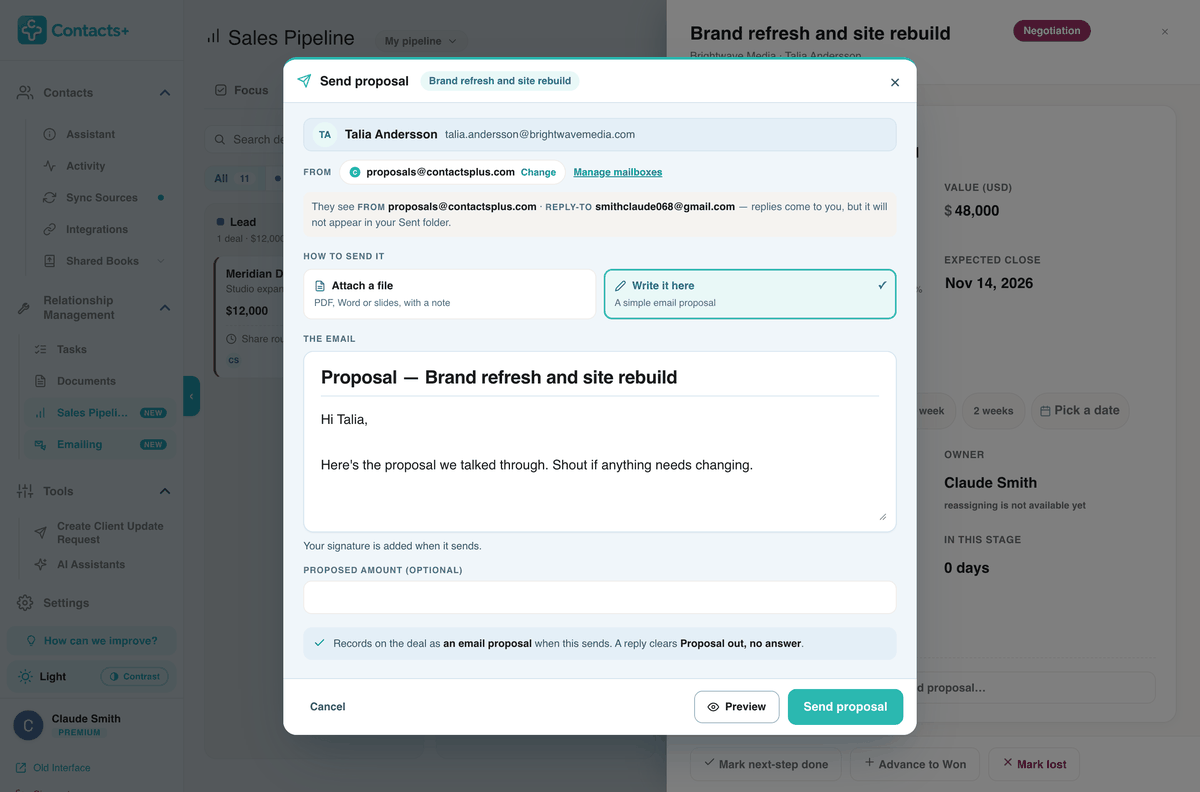
Proposals go out from the deal itself. Attach a PDF, Word file or slides from your ContactsPlus documents, or upload one, or write a simple proposal straight into the email.
- Sends from your own connected mailbox, so it lands in your Sent folder
- Or from proposals@contactsplus.com, with replies going to you
- Preview the message before it goes
- Recorded on the deal once it’s sent
Marking a deal won or lost
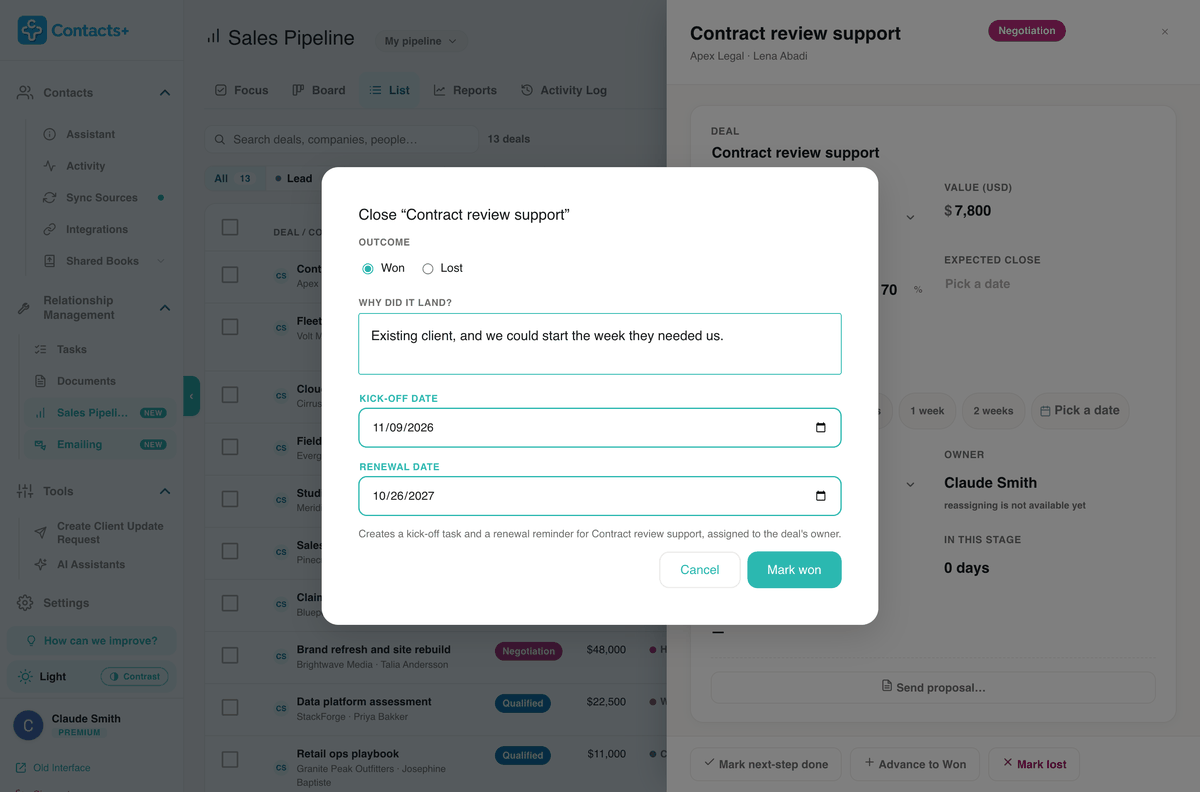
Marking a deal won asks one question: why did it land? Add a kick-off date and a renewal date, and ContactsPlus creates the kick-off task and a renewal reminder for you.
Marking a deal lost asks why as well, so you can count later whether it was price, timing or a competitor.
Reports
The numbers a manager asks for
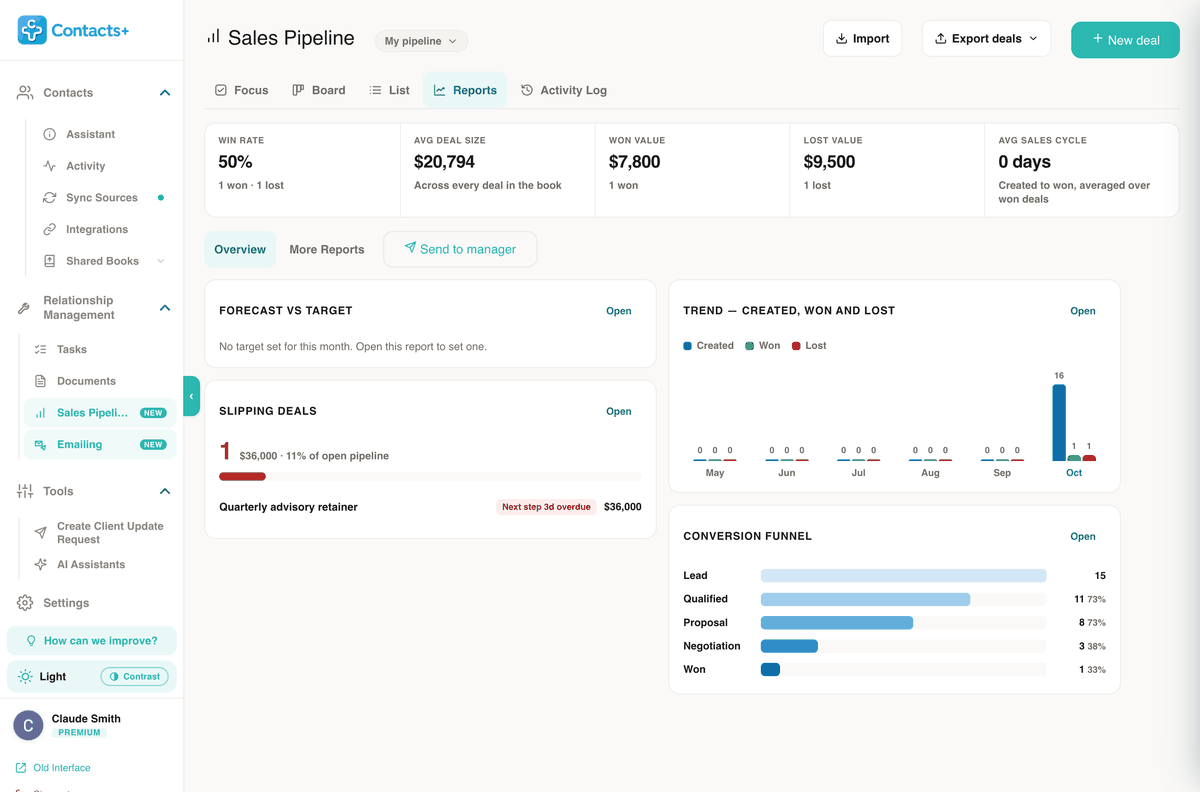
The overview opens on win rate, average deal size, won and lost value and the average time from created to won. Underneath sit the deals that are slipping, a monthly trend of deals opened against deals closed, and a conversion funnel by stage.
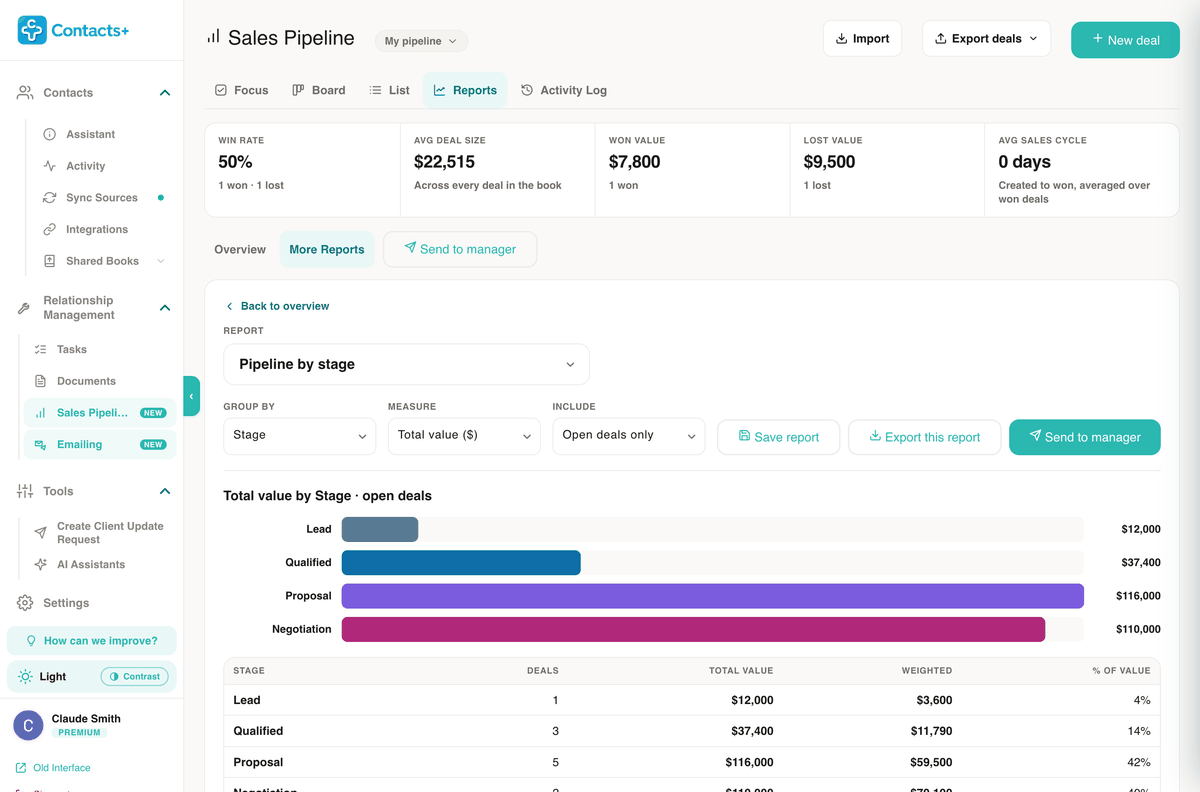
Send to manager
A view-only link to your reports. Limit it to signed-in members of the pipeline or open it to anyone with the link, and set it to expire.
Export
Download an Excel workbook with summary, by-owner and won/lost tabs, or a flat CSV with one row per deal.
Activity Log
Each change to a deal, with who made it and when. Filter it to stage moves alone when you want the story of a quarter.
The deal shows up on the person
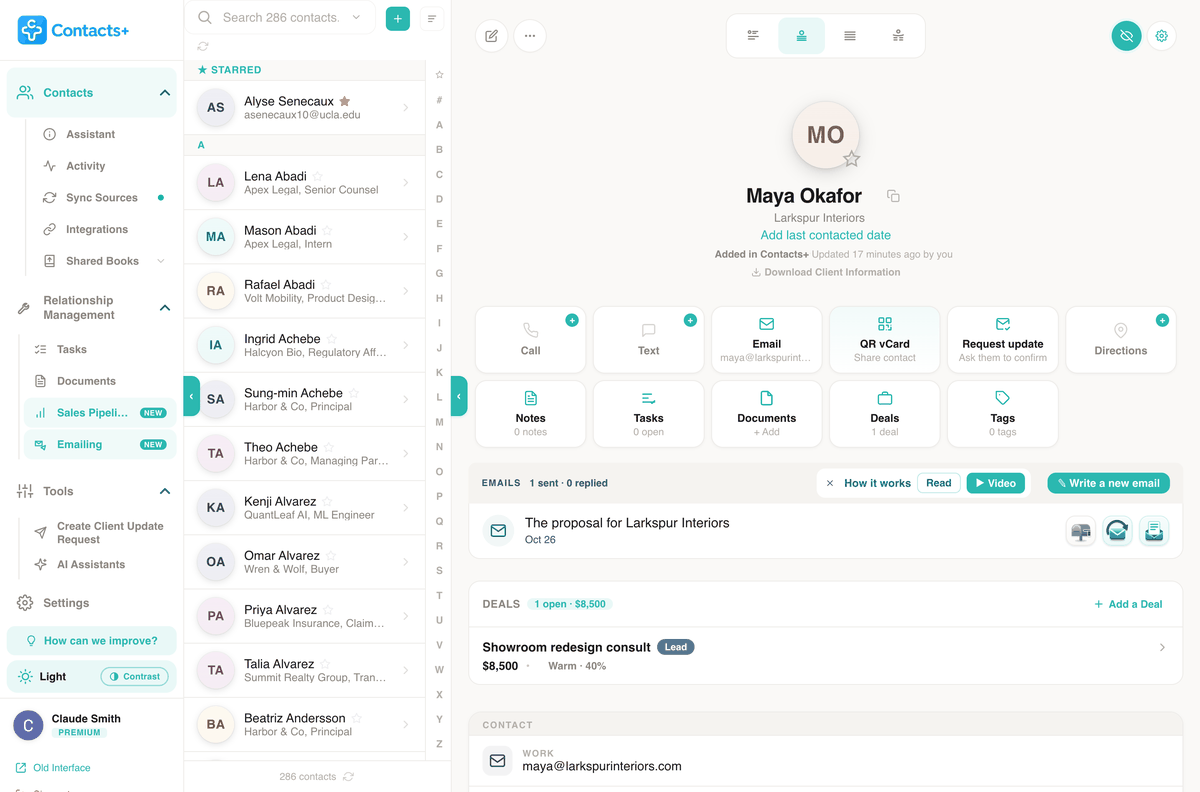
Every contact’s page shows their deals, each with its stage, value and confidence. Emails you’ve sent them from ContactsPlus sit just above, with a count of how many were answered.
You can start a deal from any contact’s page, or add a brand-new person while you create the deal.
Is it for you?
Where it fits, and where it doesn’t yet
A good fit
Consultants and small sales teams who sell to people they already know, and who want each deal and its next step on the contact instead of in a sheet.
If your contacts are already in ContactsPlus, there’s nothing to set up. Your first deal takes a name, a contact and a value.
Not the right tool yet
Teams that hand deals between reps. Each deal has an owner, and reassigning it to a colleague isn’t available yet.
Teams that need custom stages or several pipelines per person. The stages are fixed at Lead, Qualified, Proposal, Negotiation, Won and Lost.
Questions
Before you import your spreadsheet
Can I import my sales pipeline spreadsheet?
Yes. Save the sheet as a CSV and drop it into Import. Only two columns are required, the deal name and the contact; everything else is optional: email, company, value, stage, confidence, next step, next-step date, expected close and source. Columns can be in any order, extra columns are ignored, and you confirm how they line up before a single deal is created. ContactsPlus matches each row to a contact by email first, then by name and company, and attaches the deal without changing the contact. Rows it can’t match are left out and counted, deals already marked won or lost are skipped, and there’s a template to copy or download if you’d rather start clean.
What stages does the pipeline use?
Lead, Qualified, Proposal and Negotiation, then Won or Lost. Each open stage is a column on the Board, where you drag a deal when it moves, or you can press Advance on the deal itself. Every move is written to the Activity Log with who made it and when. Marking a deal won asks why it landed and creates a kick-off task and a renewal reminder; marking it lost asks for the reason, so you can see later whether you lose on price, timing or a competitor. Lost is a closing outcome rather than a column, so the board only shows deals you’re still working. The stages are fixed for now.
How is the forecast calculated?
Every deal has a value and a confidence. Hot starts at 70%, Warm at 40% and Cold at 15%, and you can type your own percentage on any deal. The forecast multiplies each open deal’s value by its percentage and adds them up, so a $48,000 deal at 75% counts as $36,000 and a $10,000 deal at 15% counts as $1,500. The total sits at the top of the pipeline next to the full open value, so you can see both the optimistic and the realistic number at a glance. Reports break it down further, with win rate, average deal size and the deals that are slipping.
Can I attach more than one deal to a contact?
Yes. A deal is its own record linked to a contact, so one client can have a renewal, an add-on and a new project open at the same time, each with its own stage, value, next step and timeline. The contact’s page shows a Deals card with every deal, its stage and a running total of what’s open, and you can start a new one from there with Add a Deal. When more than one person is involved, add them to the deal and give each a role, such as champion, decision maker, economic buyer or blocker.
Can I share the numbers with my manager?
Yes, in two ways. Send to manager creates a view-only link to your reports: either every report on the overview as one page, or just the report you have open. You choose who can open it, either signed-in members of the pipeline or anyone with the link, and whether it expires in 7, 30 or 90 days or never. Recipients see the figures and can’t edit a deal. You can also export: an Excel workbook with summary, by-owner and won/lost tabs, or a flat CSV with one row per deal.
Can I send a proposal from a deal?
Yes. Send proposal on a deal gives you two ways to do it: attach a PDF, Word file or slides, either from your ContactsPlus documents or uploaded on the spot, with a short note, or write a simple proposal straight into the email. It can go from your own connected Gmail or Outlook mailbox, so it lands in your Sent folder, or from proposals@contactsplus.com with replies coming back to your address. Your signature is added, you can preview exactly what will be sent, and the proposal is recorded on the deal once it goes.
Can I reassign deals to someone else on my team?
Not yet. Every deal shows its owner, and the Activity Log records who made each change, but you can’t hand a deal to a colleague today. That makes the pipeline a good fit for one person, or a small team working one shared book where everyone can see who did what.
Is Sales Pipeline included on the free plan?
It’s a Premium feature. Free accounts can track up to 3 deals, which is enough to try the Focus view, the board and a proposal on real work. Premium and Teams include Sales Pipeline in full, along with Emailing, tasks and follow-up reminders, and 10 GB of document storage. The pricing page compares the plans.