







For One-to-One Selling
HubSpot Alternative
for Small Business
HubSpot does a lot: marketing, sales, service and content. ContactsPlus does one thing well. It helps you win and keep customers one at a time. Every deal, every email from your own Gmail or Outlook, every follow-up and every file sits on the customer’s record, and your contacts stay clean and in sync across Google, iCloud and Outlook. From $9.99 a month, billed annually.
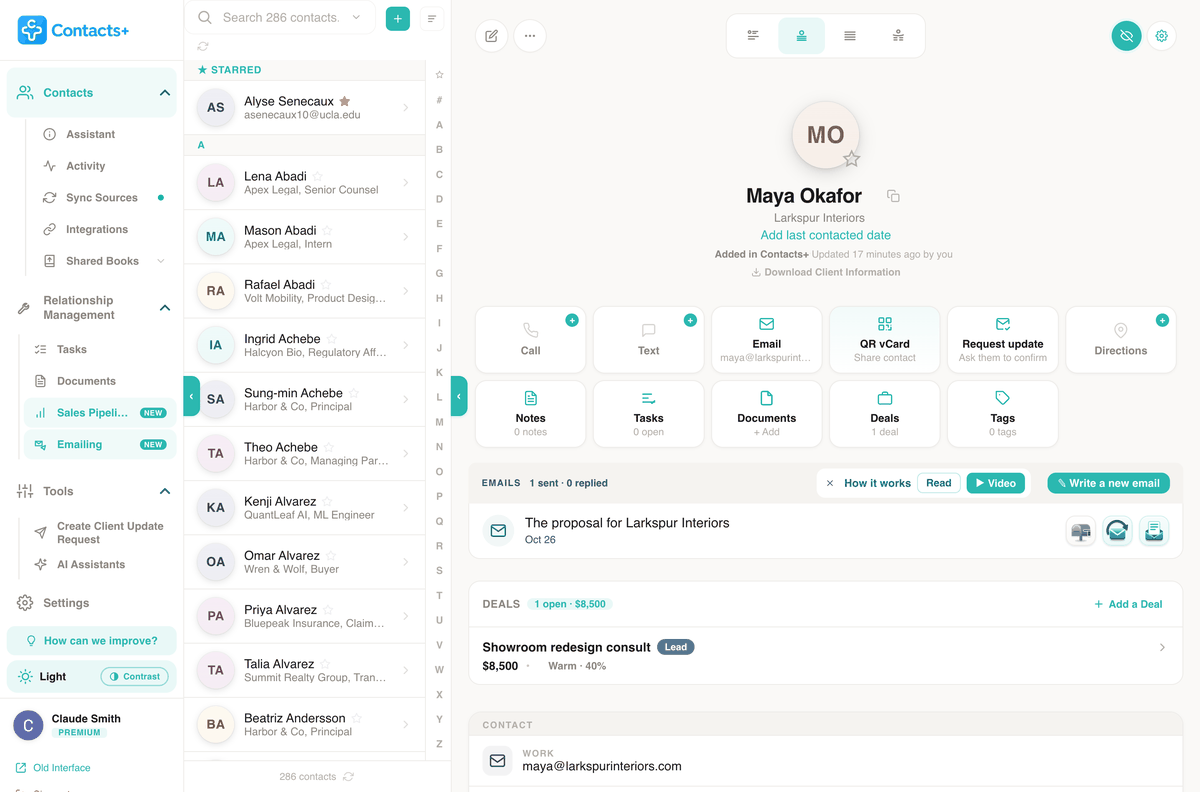
At a glance
ContactsPlus is a HubSpot alternative for small businesses that sell one-to-one: Premium is $9.99 a month billed annually for one person and includes Sales Pipeline, Emailing, Tasks and Documents, on top of sync across up to five Google, iCloud and Microsoft accounts and duplicate merging. It isn’t a marketing platform, so if you need landing pages, marketing automation or newsletters to thousands, HubSpot is the better fit.
- Sales Pipeline: each deal on its contact, with a stage, a value and a dated next step
- Emailing: personal emails to one contact or a list, sent from your own Gmail or Outlook
- Tasks and Documents: follow-up reminders and 10 GB of files on the customer’s record
- Your address books: Google, iCloud and Outlook in one list, with duplicates merged across them
Two ways to sell
One-to-many, or one-to-one
HubSpot sells separate hubs for marketing, sales, service, content and more, priced by the seat or at a base price that includes seats, and its Marketing Hub plans include a set number of marketing contacts. Sales Hub and Marketing Hub Professional each carry a required one-time onboarding fee. That structure suits a company with a marketing team sending to whole lists and a sales team working the leads that come back.
Most small businesses sell the other way round. You meet someone, send a quote, follow up, and win the job or lose it. That takes the person’s right details, a personal email from your own Gmail or Outlook, the deal and its next step, a reminder and the paperwork. It works best when all of it sits in one place.
ContactsPlus is built around that one record. Open a customer and you see the deal and where it stands, the emails you’ve sent from ContactsPlus, the task that’s due and the quote you sent. One plan covers all of it, at $9.99 a month on annual billing.
Compared
ContactsPlus vs HubSpot
for a small business
HubSpot Free is a sensible place to start, and it costs nothing while you stay inside its limits. Grow past them and the bill climbs. ContactsPlus Premium is $9.99 a month billed annually for one person, with no onboarding fee.
The free plan stops at 1,000 contacts and 2 users, and puts HubSpot branding on your emails. Starter removes that for $20 a seat a month. Forecasting and sequences need Sales Hub Professional: $90 a seat a month, plus a one-time $1,500 onboarding fee.
One person, one year, billed annually:
- ContactsPlus Premium: $119.88
- HubSpot Starter: $240
- HubSpot Professional: $2,580 in year one, then $1,080 a year
New customers can get Starter at $7 a seat ($84 a year) for a limited time. HubSpot’s terms let it raise that to list price at renewal, so we compare list prices.
| ContactsPlus Premium | HubSpot | |
|---|---|---|
| Where ContactsPlus shines | ||
| Price per year, one person | $119.88 | Starter: $240 a seat at list ($84 on the new-customer offer). Professional: $1,080 a seat, plus the $1,500 fee in year one |
| Onboarding fee | None | Sales Hub Professional: $1,500, required |
| Forecasting | Weighted forecast and win-rate reports, included | Forecasting tool: not in Free or Starter. Sales Hub Professional, from $90 a seat a month |
| Duplicate review | Across every connected account, even under two email addresses | Free and Starter: matched by email, the rest merged by hand. Duplicate tool: Smart CRM Professional, from $45 a seat a month billed annually, and part of Sales Hub Professional |
| Email to a list from your own inbox | One personal copy each, from your own Gmail or Outlook, up to 1,000 people per send | Marketing email to lists from Free (2,000 sends a month, with HubSpot branding on Free). Sequences start in Sales Hub Professional |
HubSpot prices are from its pricing pages, Product & Services Catalog and customer terms, checked 29 October 2026, billed annually. Prices change, so check theirs before you decide. ContactsPlus plans are on the pricing page.
Pick HubSpot if
You market to big lists or want automation: marketing email, forms, landing pages and workflows. It also suits a sales team that needs several pipelines, or two people who fit inside the free plan’s 1,000 contacts.
Pick ContactsPlus if
You sell one-to-one from your own Gmail or Outlook, and your contacts live in Google, iCloud or Outlook. Premium puts them in one list with duplicates reviewed, then adds a pipeline with a forecast, email to one person or a list, reminders and files, for $119.88 a year.
Sales Pipeline: the deal on the customer’s record
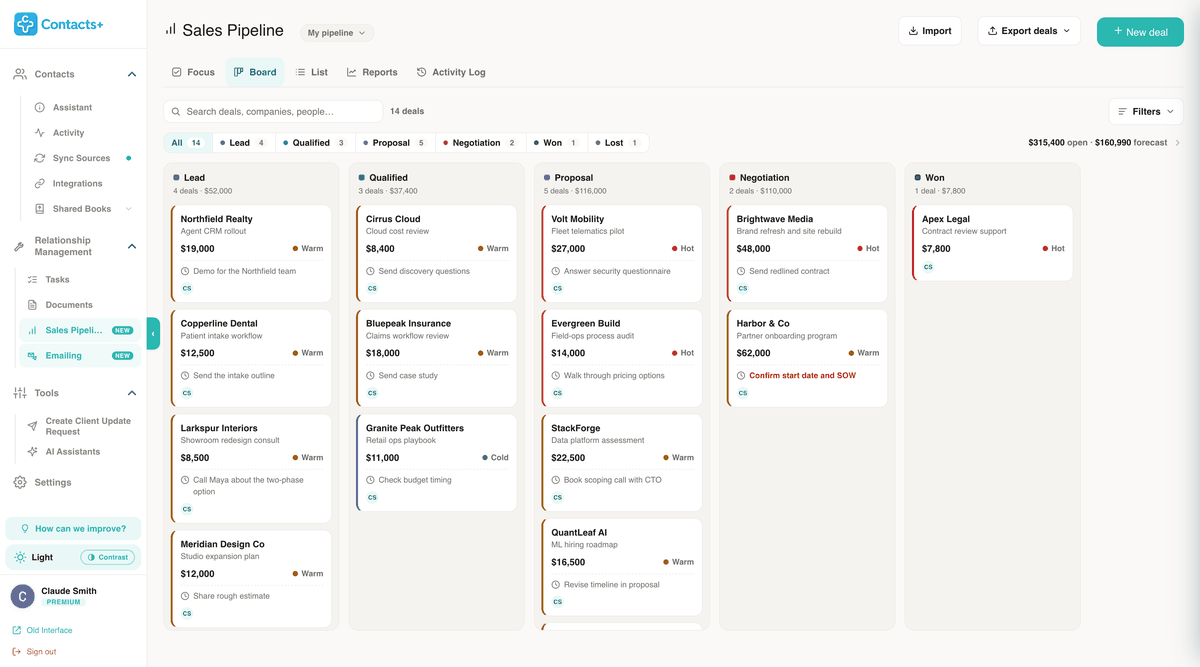
Every deal belongs to a contact and carries a value, a stage from Lead to Won or Lost, a confidence and one next step with a date. Drag a card from stage to stage on the board, or open the Focus view to see which next steps are overdue, due today and due this week.
Reports show your win rate, deal size and a weighted forecast, and a pipeline spreadsheet comes in as a CSV. A free account can track up to 3 deals. The sales pipeline tracker page walks through each view.
Emailing: one-to-one email from your own inbox
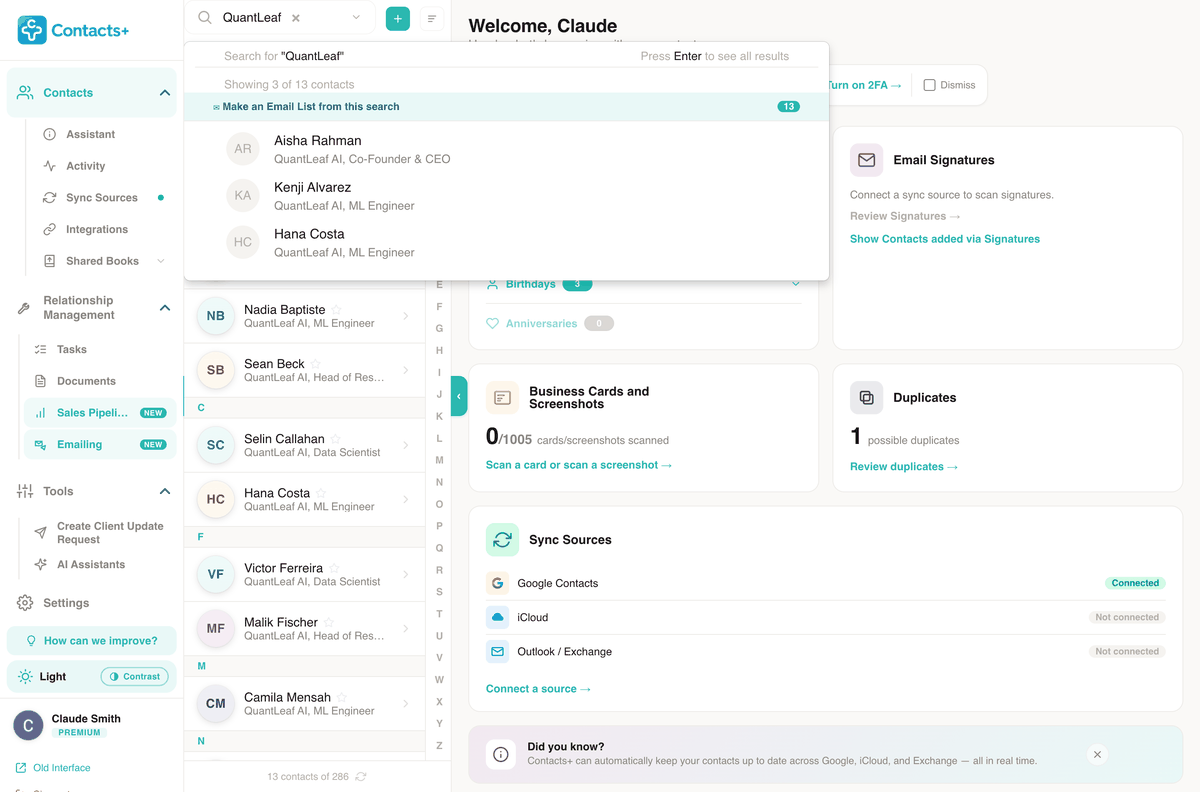
Write to one customer, or to an Email List built from a contact search, such as everyone at one company. Each person gets their own copy with their name and company filled in. It’s sent from your Gmail, Google Workspace or Outlook mailbox, so it sits in your Sent folder like any email you write. iCloud Mail can’t be connected for sending.
A list goes out at the pace you set, 30 an hour and 250 a day by default, inside the limits Google and Microsoft allow. If you let ContactsPlus check for replies, each one is noted on the contact and anything else queued to that person is held. Free accounts can send 20 emails in total. The pages on mail merge in Gmail and mail merge in Outlook show a send step by step.
Tasks: the follow-up, with a reminder
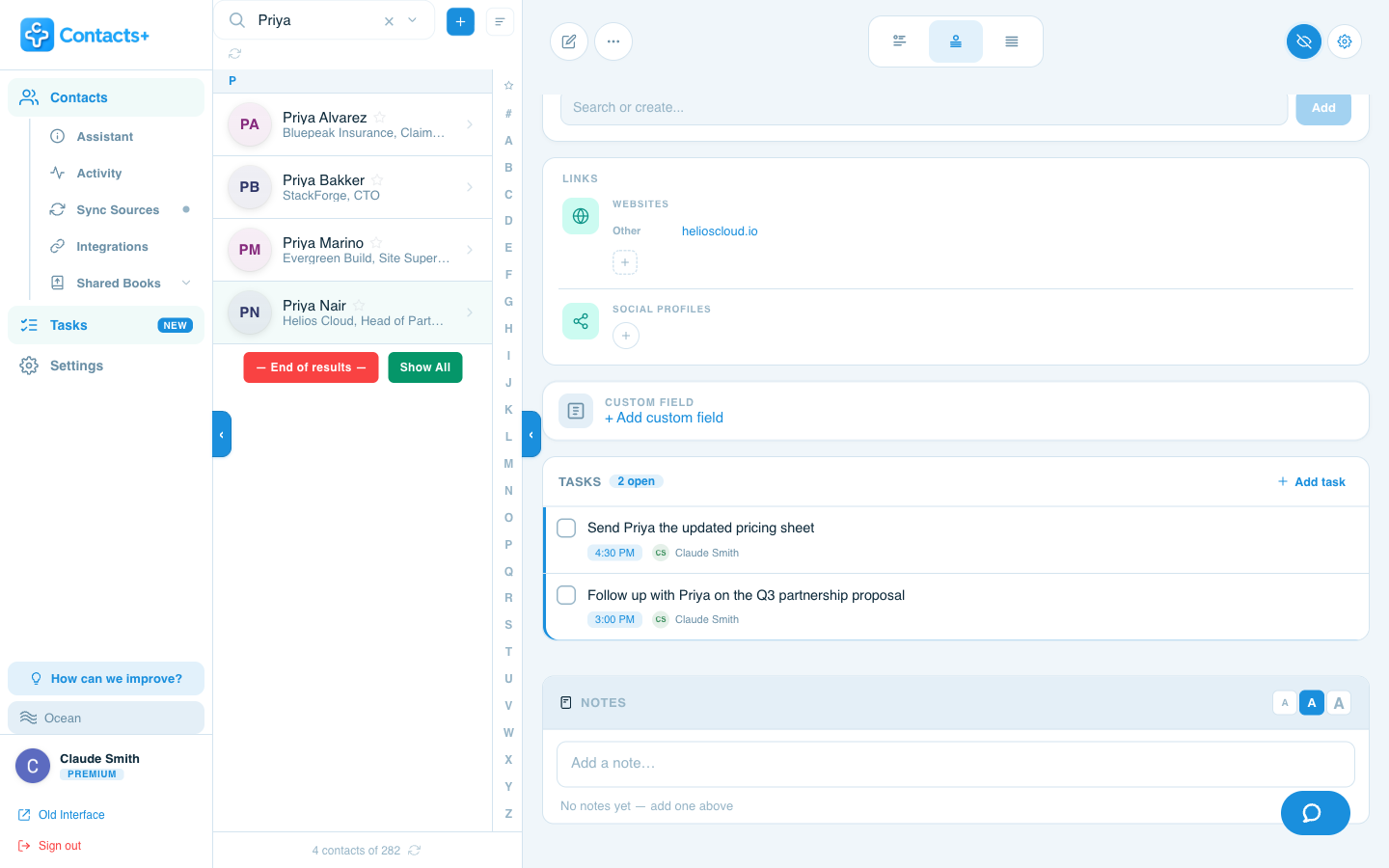
Add a task to a customer with a due date and time and ContactsPlus reminds you, 15 minutes before by default. Open the contact and its open tasks sit on the record above your notes, so you see what you promised before you call.
A task with a due time can push one way to your Google, Outlook or Apple calendar. You can also turn on a 9 AM digest of what’s due that day. Every account gets a trial, and creating reminders after it is part of Premium. Here’s how follow-up reminders work.
Documents: the paperwork on the contact
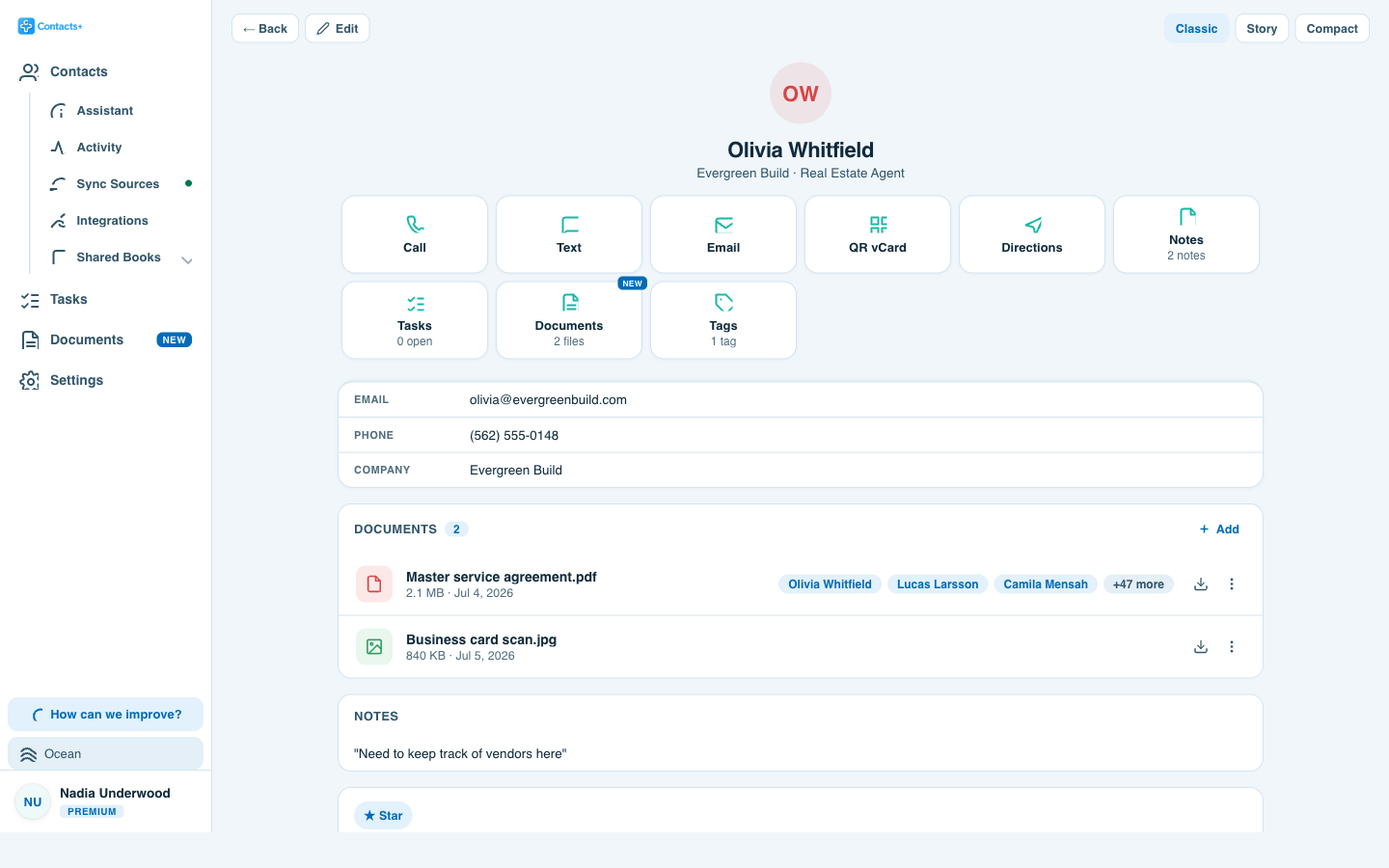
Attach a quote, a contract or a scan to the person it belongs to, and link the same file to their company or anyone else it involves. It’s stored once however many contacts it sits on, and it’s on the record you open when the customer calls back.
Premium has 10 GB of storage with up to 25 MB per file, and deleted files sit in a 30-day Trash, where you can restore them. Attaching files to contacts covers the library and each contact layout.
Included too
Your contacts, synced and de-duplicated
Every Premium plan also keeps the address books you already use in sync, and clean.
Customers end up spread across a work Gmail, a personal iCloud, an old Outlook account and your phone. Premium connects up to five of those accounts and pulls them into one list of up to 25,000 contacts, kept in sync automatically. You choose a direction for each account, from reading contacts in only to syncing both ways, and the contact sync page shows how.
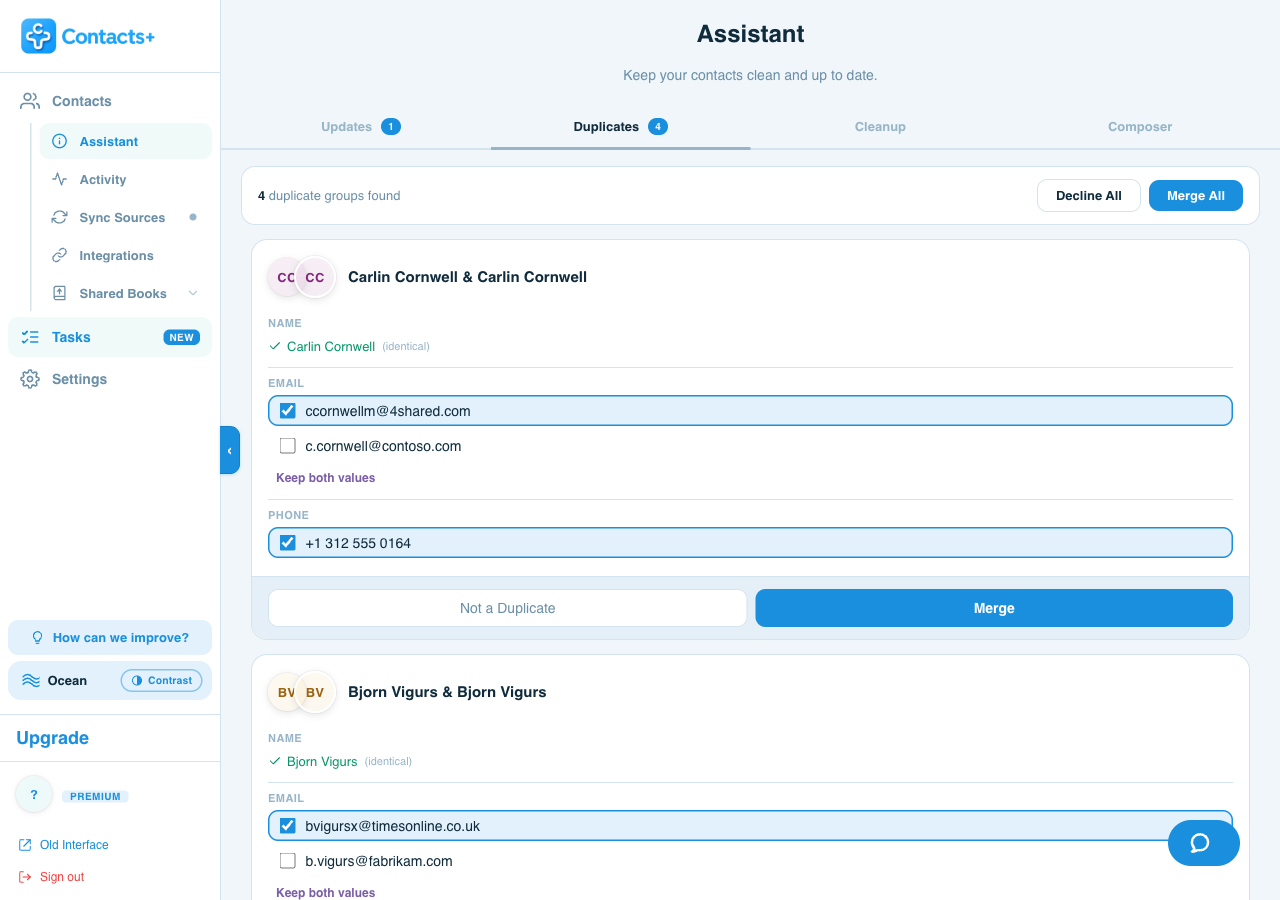
The same person saved in two accounts becomes a duplicate pair, even when the two records have different email addresses. Premium finds the pairs across every connected account and shows the differences field by field, so you pick which phone number stays before anything merges. With two-way sync on, the clean version goes back to every account. Removing duplicate contacts covers the steps, and there’s a separate guide to merging duplicate contacts on iPhone.
HubSpot can sync contacts too. It builds data sync apps that connect Google Contacts and iCloud to its CRM. On every plan it matches incoming contacts by email address, so an import updates an existing record rather than adding a second one, and two records can be merged by hand. Its duplicate management tool is part of Smart CRM Professional, from $45 a seat a month billed annually. The difference is where each one starts. HubSpot starts from its CRM database. ContactsPlus starts from your address books, and the CRM tools sit on top of them.
Worth knowing first
When HubSpot is the better choice
If you market to whole lists, HubSpot is built for it, with marketing email, landing pages and marketing automation in its plans. ContactsPlus sends from your own Gmail or Outlook, inside that mailbox’s daily limit and up to 1,000 people per send. That suits personal email to customers, not newsletters to thousands of subscribers.
Sales teams should look closely too. The ContactsPlus pipeline has one fixed set of stages, Lead, Qualified, Proposal and Negotiation, then Won or Lost, and on Teams a deal can’t yet be handed to a colleague. HubSpot Starter allows up to 15 pipelines across deals and its other object types, and its Professional tier adds sequences and up to 100 pipelines.
And if you need ticketing for customer support, invoicing, time tracking or project tracking, ContactsPlus has none of those. HubSpot includes ticketing on its free plan.
And Salesforce?
A Salesforce alternative
for small business
Salesforce lists its Starter Suite at $25 per user a month, billed monthly or annually. Its Pro Suite, which adds quoting and forecasting, is $100 per user a month billed annually. There’s also a Free Suite. Salesforce calls its sales software fully customizable, and that’s what you’re paying for when you need deep customization.
If you’re one person selling one customer at a time, ContactsPlus Premium covers the pipeline, a weighted forecast and personal email from your own mailbox for $9.99 a month on annual billing. A second person needs Teams, at $12.99 per user a month. Prices are from Salesforce’s sales pricing page on 29 October 2026.
Just you
A CRM for a one-person business
Premium is a plan for one person, priced as one: $9.99 a month on annual billing or $13.99 month to month. There are no seats to count and no onboarding fee. Cancel anytime from your account settings, and access runs to the end of the period you’ve paid for.
What a solo business needs is short. Who to follow up with today, where each deal stands, and a way to write to a client that doesn’t read like a newsletter. CRM for freelancers is built around past clients and open inquiries, and CRM for consultants around referral partners and retainers.
When a second person needs the same list, Teams adds a shared address book at $12.99 per user a month billed annually, for up to 50 people.
Switching
Moving over from HubSpot
Export your contacts and deals
HubSpot lets you export contacts and deals as a CSV file on every plan.
Connect your accounts, then import
Connect the Google, iCloud and Microsoft accounts your customers already live in. Premium takes up to five. Then bring in the contacts file, and the import contacts page shows how.
Review the duplicate pairs
A customer who was in HubSpot and on your phone shows up as a pair. You choose which values stay, then merge.
Bring in your open deals
Import the deals file into the pipeline. Only the deal name and the contact are required, you confirm how the columns line up, and deals already marked won or lost are skipped.
Connect your mailbox
Link the Gmail or Outlook account you write to customers from, so emails go out under your own name.
Questions
Frequently asked questions
What is a cheaper alternative to HubSpot?
It depends on the plan. ContactsPlus costs less than HubSpot Professional and less than Starter at list price, but not less than HubSpot’s free tools, which cost $0 for up to 2 users, or its current new-customer Starter offer. When we checked on 29 October 2026, HubSpot was offering new customers Starter for a limited time at $7 a seat a month billed annually, which is $84 a year and less than Premium. Its monthly-billed offer is $10 a seat. Starter lists at $20 a seat a month, or $240 a year. HubSpot’s forecasting tool and sequences start in Sales Hub Professional, at $90 a seat a month billed annually plus a required $1,500 onboarding fee, which comes to $2,580 for one person in the first year. Professional also brings up to 300 workflows and up to 100 pipelines. ContactsPlus Premium is $119.88 a year on annual billing for one person, with no onboarding fee. It includes a pipeline with a weighted forecast, personal email from your own mailbox, tasks, 10 GB of documents, and sync and duplicate review across five accounts. HubSpot’s customer terms (section 3.2) let it raise fees at renewal up to its then-current list price, with 30 days’ notice.
Why not use HubSpot’s free CRM?
If you’re inside its limits, it’s a good place to start. It’s free for up to 2 users with no time limit, and it includes deal pipelines. For one-to-one selling the limits come quickly. It holds 1,000 contacts, and for more you upgrade to a paid plan. Its 1-to-1 emails carry HubSpot branding, it allows 3 email templates, and forecasting, sequences and the duplicate management tool sit in HubSpot’s Professional tiers. ContactsPlus Premium costs $9.99 a month on annual billing. It brings up to 25,000 contacts from five Google, iCloud and Microsoft accounts into one list and reviews duplicates across them. The pipeline with its weighted forecast, personal email from your own mailbox, follow-up reminders and 10 GB of files sit on the customer’s record.
Is ContactsPlus a good Salesforce alternative for a small business?
For a small business that sells one customer at a time, yes. Salesforce lists Starter Suite at $25 per user a month and Pro Suite at $100 per user a month billed annually. ContactsPlus Premium is $9.99 a month on annual billing for one person, with a pipeline, a weighted forecast, email from your own Gmail or Outlook, tasks and documents. Salesforce is the stronger choice when you need deep customization and automation.
What is the best CRM for a one-person business?
For most solo businesses the CRM has a short list of jobs: contacts that stay accurate, a reminder to follow up, deals with a next step, and personal email to clients. ContactsPlus Premium covers those for $9.99 a month on annual billing, priced for one person with no seats to count. If you also need invoicing or time tracking, a tool built for those will suit you better.
Does ContactsPlus sync with my phone and remove duplicate contacts?
Yes. If your iPhone keeps its contacts in iCloud, they come in through iCloud, and an Android phone’s come in through Google. Premium connects up to five Google, iCloud and Microsoft accounts and keeps them in sync. It finds duplicate pairs across all of them, including the same person saved with two email addresses. You review each pair before it merges, and with two-way sync on, the clean record goes back to your phone.
Can I move my contacts and deals from HubSpot?
Yes. HubSpot lets you export contacts and deals as CSV on every plan. Import the contacts file into ContactsPlus, or connect the Google, iCloud or Microsoft accounts they already live in. Open deals come across through the pipeline’s CSV import. Only the deal name and the contact are required, you confirm how the columns line up, and deals already marked won or lost are skipped.
How much does ContactsPlus cost?
Premium costs $119.88 a year on annual billing, or $13.99 a month paid monthly. Teams is $12.99 per user a month billed annually and $17.99 billed monthly, for up to 50 people. Every feature is listed by plan on the pricing page.
Are Sales Pipeline and Emailing free?
They’re part of Premium and Teams. A free account can try them with up to 3 deals and 20 emails in total. The free plan itself connects one account, holds up to 1,000 contacts and syncs daily. The pricing page lists every feature by plan.
A small CRM
for one-to-one selling.
Premium is $9.99 a month on annual billing, with sync and duplicate cleanup included.
Get started